【开源】QQ头像圣诞帽生成网站源码
- 2026-09-24 08:56:36
【开源】QQ头像圣诞帽生成网站源码我写了一个小工具,可以用 AI 给你的 QQ 头像戴上可爱的圣诞帽。功能很直观:你输入 QQ 号,它会生成一张带圣诞帽的头像,风格喜庆,红白经典,保留原头像特征。 最大的原因其实很简单——圣诞节到了,想让头像更有节日气息,但自己动手 PS 太慢了。碰巧自己会一点点 AI 调用和前端开发技能,于是就新建仓库开写了! 调了几个版本的 prompt,尝试让 AI 自动给头像加圣诞帽——结果,还真挺可爱。 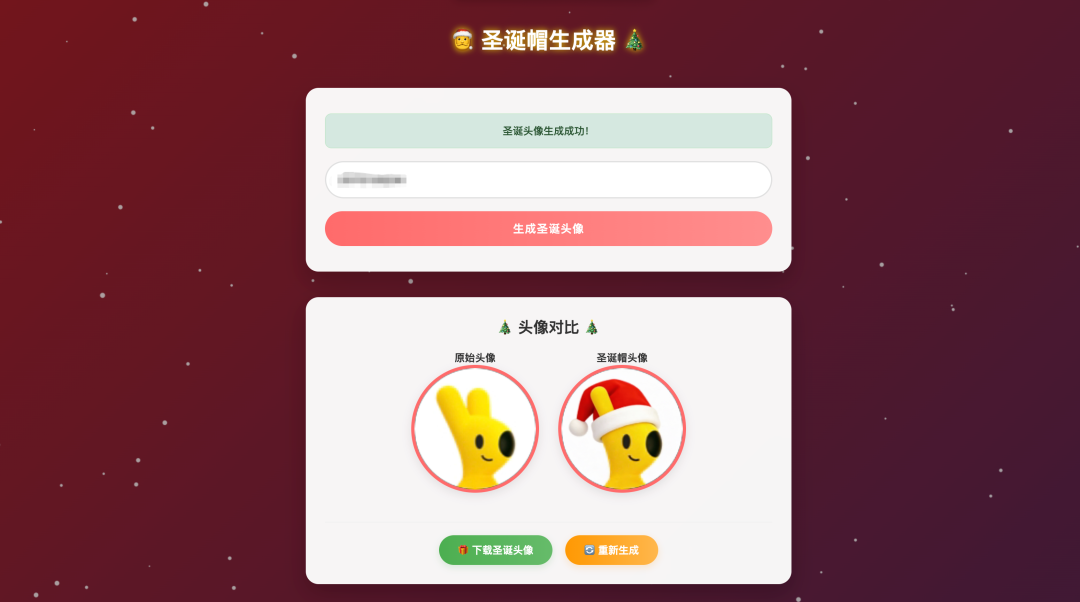
「数字时代的节日趣味,可能就在你的头像里悄悄萌芽。」 逻辑其实不复杂: 输入你的 QQ 头像 URL prompt 告诉大模型:“在保证头像人物特征不变的前提下,给他戴上喜庆的圣诞帽” 这个项目其实不解决什么大问题。它只是想帮像我一样的懒人,在节日头像上多一点创意。 技术层面,它是一次简单的 AI 图像生成应用实践; 生活层面,它可能让你的 QQ 头像更有节日氛围,顺便体验 AI 的小魔法。 它不是完美工具,也不复杂,只是比手动 PS 多了一点智能,比平时多了一点趣味。 项目名字叫《QQ头像圣诞帽生成器》,完全开源。 使用PHP开发,找一个装了PHP环境的服务器运行就可以啦。记得替换一下对接的key。 模型使用豆包的旗舰图生图模型doubao-seedream-4-5-251128 代码如下: 只要输入 QQ 号,就能生成节日头像。想给自己或朋友的头像换个帽子?点开试试就行。 我只是写了点代码,剩下的乐趣,就交给你自己了。
🎄 为什么会想写这个?
✨ AI 是怎么“理解头像”的?
📬 写完之后的一些想法
📌 现在能在哪用?
<?php$imageUrl = '';$originalAvatarUrl = '';$errorMsg = '';$successMsg = '';$isLoading = false;if ($_SERVER['REQUEST_METHOD'] === 'POST') {$isLoading = true;$qq = trim($_POST['qq'] ?? '');// 验证QQ号格式if (empty($qq)) {$errorMsg = "请填写 QQ 号";$isLoading = false;} elseif (!is_numeric($qq) || strlen($qq) < 5 || strlen($qq) > 13) {$errorMsg = "请输入有效的 QQ 号(5-13位数字)";$isLoading = false;} else {$originalAvatarUrl = "https://q1.qlogo.cn/g?b=qq&nk={$qq}&s=640";$apiUrl = "https://ark.cn-beijing.volces.com/api/v3/images/generations";$apiKey = "你的key";$data = ["model" => "doubao-seedream-4-5-251128","prompt" => "给这个头像戴上可爱的圣诞帽,保留人物特征,圣诞帽要贴合头部,风格喜庆,颜色经典红白色","image" => $originalAvatarUrl,"sequential_image_generation" => "disabled","response_format" => "url","size" => "1920x1920","stream" => false,"watermark" => true];$ch = curl_init($apiUrl);curl_setopt($ch, CURLOPT_RETURNTRANSFER, true);$headers = ["Content-Type: application/json","Authorization: Bearer {$apiKey}"];curl_setopt($ch, CURLOPT_HTTPHEADER, $headers);curl_setopt($ch, CURLOPT_POST, true);curl_setopt($ch, CURLOPT_POSTFIELDS, json_encode($data));curl_setopt($ch, CURLOPT_TIMEOUT, 30);curl_setopt($ch, CURLOPT_SSL_VERIFYPEER, false);$response = curl_exec($ch);$httpCode = curl_getinfo($ch, CURLINFO_HTTP_CODE);$curlError = curl_error($ch);curl_close($ch);$isLoading = false;if ($curlError) {$errorMsg = "请求接口失败:{$curlError}";} elseif ($httpCode !== 200) {$errorMsg = "接口返回错误,状态码:{$httpCode}";if (!empty($response)) {$errorData = json_decode($response, true);if ($errorData && isset($errorData['error']['message'])) {$errorMsg .= ",错误信息:" . $errorData['error']['message'];}}} else {$result = json_decode($response, true);if (json_last_error() !== JSON_ERROR_NONE) {$errorMsg = "接口返回数据格式错误,JSON错误:" . json_last_error_msg();} elseif (!empty($result['data'][0]['url'])) {$imageUrl = $result['data'][0]['url'];$successMsg = "圣诞头像生成成功!";} else {$errorMsg = "生成失败:" . (isset($result['error']['message']) ? $result['error']['message'] : '未知错误');}}}}?><!DOCTYPE html><html lang="zh-CN"><head><meta charset="UTF-8"><meta name="viewport" content="width=device-width, initial-scale=1.0"><title>圣诞帽生成器</title><style>/* 全局样式重置 */* {margin: 0;padding: 0;box-sizing: border-box;font-family: 'Microsoft YaHei', 'PingFang SC', sans-serif;}/* 调试日志样式 */pre {position: relative;z-index: 10;background: rgba(0,0,0,0.8);color: #00ff00;padding: 20px;margin: 20px;border-radius: 10px;font-size: 14px;line-height: 1.5;max-height: 400px;overflow-y: auto;}/* 背景与雪花画布 */body {min-height: 100vh;background: linear-gradient(135deg, #1a2a6c, #b21f1f, #1a2a6c);background-size: 400% 400%;animation: gradientBG 15s ease infinite;overflow-x: hidden;position: relative;padding-bottom: 50px;}@keyframes gradientBG {0% { background-position: 0% 50%; }50% { background-position: 100% 50%; }100% { background-position: 0% 50%; }}/* 雪花画布样式 */#snow {position: fixed;top: 0;left: 0;width: 100%;height: 100%;pointer-events: none;z-index: 1;}/* 遮罩层 */.overlay {position: fixed;top: 0;left: 0;width: 100%;height: 100%;background: rgba(0, 0, 0, 0.3);z-index: 2;}/* 主容器 */.container {position: relative;z-index: 3;max-width: 800px;margin: 0 auto;padding: 60px 20px;text-align: center;}/* 标题样式 */h1 {color: #fff;font-size: 2.2rem;margin-bottom: 40px;text-shadow: 0 0 10px rgba(255, 215, 0, 0.8);animation: titleFloat 3s ease-in-out infinite;}@keyframes titleFloat {0%, 100% { transform: translateY(0); }50% { transform: translateY(-10px); }}/* 表单卡片 */.form-card {background: rgba(255, 255, 255, 0.95);padding: 40px 30px;border-radius: 20px;box-shadow: 0 15px 35px rgba(0, 0, 0, 0.2);backdrop-filter: blur(10px);transition: transform 0.3s ease;margin-bottom: 40px;}.form-card:hover {transform: translateY(-5px);}/* 输入框样式 */input[type="text"] {width: 100%;padding: 15px 20px;margin-bottom: 20px;border: 2px solid #e0e0e0;border-radius: 50px;font-size: 1.1rem;outline: none;transition: all 0.3s ease;}input[type="text"]:focus {border-color: #ff6b6b;box-shadow: 0 0 10px rgba(255, 107, 107, 0.3);}input[type="text"]::placeholder {color: #999;}/* 按钮样式 */button {width: 100%;padding: 15px 20px;background: linear-gradient(90deg, #ff6b6b, #ff8e8e);color: #fff;border: none;border-radius: 50px;font-size: 1.1rem;font-weight: bold;cursor: pointer;transition: all 0.3s ease;text-transform: uppercase;letter-spacing: 1px;}button:hover:not(:disabled) {background: linear-gradient(90deg, #ff5252, #ff6b6b);transform: scale(1.02);box-shadow: 0 5px 15px rgba(255, 107, 107, 0.4);}button:active:not(:disabled) {transform: scale(0.98);}button:disabled {background: linear-gradient(90deg, #cccccc, #dddddd);cursor: not-allowed;transform: none;box-shadow: none;}/* 头像展示区域 */.avatar-result {display: none;background: rgba(255, 255, 255, 0.95);padding: 30px;border-radius: 20px;box-shadow: 0 15px 35px rgba(0, 0, 0, 0.2);backdrop-filter: blur(10px);margin-bottom: 30px;}.avatar-container {display: flex;flex-wrap: wrap;justify-content: center;gap: 30px;margin-top: 20px;margin-bottom: 30px; /* 增加底部间距,为按钮组留出空间 */}.avatar-item {text-align: center;}.avatar-img {width: 200px;height: 200px;border-radius: 50%;object-fit: cover;border: 5px solid #ff6b6b;box-shadow: 0 5px 15px rgba(0, 0, 0, 0.1);margin-bottom: 10px;}.avatar-label {color: #333;font-weight: bold;font-size: 1rem;}/* 操作按钮组 - 重点优化 */.action-buttons {display: flex;justify-content: center;gap: 20px;padding-top: 20px;border-top: 1px solid #eee;margin-top: 10px;}/* 下载按钮样式优化 */.download-btn {display: inline-block;padding: 12px 30px;background: linear-gradient(90deg, #4CAF50, #66bb6a);color: white;text-decoration: none;border-radius: 50px;font-weight: bold;transition: all 0.3s ease;font-size: 1rem;box-shadow: 0 4px 12px rgba(76, 175, 80, 0.2);}.download-btn:hover {background: linear-gradient(90deg, #45a049, #5cb85c);transform: translateY(-2px);box-shadow: 0 6px 16px rgba(76, 175, 80, 0.3);}.regenerate-btn {display: inline-block;padding: 12px 30px;background: linear-gradient(90deg, #ff9800, #ffb74d);color: white;text-decoration: none;border-radius: 50px;font-weight: bold;transition: all 0.3s ease;font-size: 1rem;box-shadow: 0 4px 12px rgba(255, 152, 0, 0.2);}.regenerate-btn:hover {background: linear-gradient(90deg, #f57c00, #ffa726);transform: translateY(-2px);box-shadow: 0 6px 16px rgba(255, 152, 0, 0.3);}/* 提示信息样式 */.message {padding: 15px;border-radius: 10px;margin-bottom: 20px;font-size: 1rem;font-weight: 500;display: none;}.error-message {background: rgba(248, 215, 218, 0.9);color: #721c24;border: 1px solid #f5c6cb;}.success-message {background: rgba(209, 231, 221, 0.9);color: #285430;border: 1px solid #c3e6cb;}/* 加载动画 */.loading {display: none;text-align: center;padding: 20px;color: #ff6b6b;font-size: 1.1rem;}.spinner {border: 4px solid rgba(255, 107, 107, 0.3);border-radius: 50%;border-top: 4px solid #ff6b6b;width: 40px;height: 40px;animation: spin 1s linear infinite;margin: 0 auto 15px;}@keyframes spin {0% { transform: rotate(0deg); }100% { transform: rotate(360deg); }}/* 响应式适配 */@media (max-width: 600px) {h1 {font-size: 1.8rem;}.form-card {padding: 30px 20px;}input[type="text"], button {font-size: 1rem;padding: 12px 18px;}.avatar-img {width: 150px;height: 150px;}.avatar-container {gap: 20px;}pre {font-size: 12px;margin: 10px;padding: 15px;}/* 移动端按钮组改为垂直排列 */.action-buttons {flex-direction: column;gap: 15px;padding: 0 20px;}.download-btn, .regenerate-btn {width: 100%;text-align: center;}}</style></head><body><div class="overlay"></div><div class="container"><h1>🎅 圣诞帽生成器 🎄</h1><div class="form-card"><!-- 错误提示 --><?php if ($errorMsg): ?><div class="message error-message" style="display: block;"><?php echo htmlspecialchars($errorMsg); ?></div><?php endif; ?><!-- 成功提示 --><?php if ($successMsg): ?><div class="message success-message" style="display: block;"><?php echo htmlspecialchars($successMsg); ?></div><?php endif; ?><!-- 加载动画 --><?php if ($isLoading): ?><div class="loading" style="display: block;"><div class="spinner"></div><p>正在生成圣诞头像,请稍候...</p></div><?php endif; ?><form method="POST" id="avatarForm"><input type="text" name="qq" placeholder="请输入 QQ 号" requiredvalue="<?php echo isset($_POST['qq']) ? htmlspecialchars($_POST['qq']) : ''; ?>"><button type="submit" <?php echo $isLoading ? 'disabled' : ''; ?>><?php echo $isLoading ? '生成中...' : '生成圣诞头像'; ?></button></form></div><!-- 头像展示区域 --><?php if ($originalAvatarUrl): ?><div class="avatar-result" style="display: block;"><h2 style="color: #333; margin-bottom: 20px; font-size: 1.5rem;">🎄 头像对比 🎄</h2><div class="avatar-container"><!-- 原始头像 --><div class="avatar-item"><p class="avatar-label">原始头像</p><img src="<?php echo htmlspecialchars($originalAvatarUrl); ?>" alt="原始QQ头像" class="avatar-img" onerror="this.src='https://via.placeholder.com/200/cccccc/666666?text=头像加载失败'"></div><!-- 生成的圣诞头像 --><div class="avatar-item"><p class="avatar-label">圣诞帽头像</p><?php if ($imageUrl): ?><img src="<?php echo htmlspecialchars($imageUrl); ?>" alt="带圣诞帽的QQ头像" class="avatar-img" onerror="this.src='https://via.placeholder.com/200/cccccc/666666?text=生成失败'"><?php else: ?><div style="width: 200px; height: 200px; border-radius: 50%; border: 5px solid #ff6b6b; display: flex; align-items: center; justify-content: center; background: #f5f5f5;"><span style="color: #999;">暂无生成结果</span></div><?php endif; ?></div></div><!-- 操作按钮组 - 新的位置 --><?php if ($imageUrl): ?><div class="action-buttons"><a href="<?php echo htmlspecialchars($imageUrl); ?>" class="download-btn" download="圣诞头像_<?php echo $qq; ?>.png">🎁 下载圣诞头像</a><a href="" class="regenerate-btn" onclick="document.getElementById('avatarForm').submit(); return false;">🔄 重新生成</a></div><?php endif; ?></div><?php endif; ?></div><canvas id="snow"></canvas><script>// 雪花特效JS代码(function() {const canvas = document.getElementById('snow');const ctx = canvas.getContext('2d');let width = window.innerWidth;let height = window.innerHeight;let snowflakes = [];// 设置画布尺寸function resizeCanvas() {width = window.innerWidth;height = window.innerHeight;canvas.width = width;canvas.height = height;}resizeCanvas();window.addEventListener('resize', resizeCanvas);// 雪花类class Snowflake {constructor() {this.x = Math.random() * width;this.y = Math.random() * height;this.size = Math.random() * 3 + 1;this.speed = Math.random() * 2 + 0.5;this.angle = Math.random() * Math.PI * 2;}update() {// 雪花下落 + 左右摆动this.x += Math.sin(this.angle) * 1.5;this.y += this.speed;this.angle += 0.02;// 雪花落到底部后重置if (this.y > height) {this.x = Math.random() * width;this.y = -10;this.size = Math.random() * 3 + 1;this.speed = Math.random() * 2 + 0.5;}}draw() {ctx.beginPath();ctx.arc(this.x, this.y, this.size, 0, Math.PI * 2);ctx.fillStyle = 'rgba(255, 255, 255, 0.8)';ctx.fill();}}// 创建雪花function createSnowflakes(count = 100) {snowflakes = [];for (let i = 0; i < count; i++) {snowflakes.push(new Snowflake());}}// 动画循环function animate() {ctx.clearRect(0, 0, width, height);snowflakes.forEach(snowflake => {snowflake.update();snowflake.draw();});requestAnimationFrame(animate);}// 初始化createSnowflakes();animate();})();// 表单提交处理document.getElementById('avatarForm').addEventListener('submit', function() {const button = this.querySelector('button');button.disabled = true;button.textContent = '生成中...';// 显示加载状态const loadingDiv = document.createElement('div');loadingDiv.className = 'loading';loadingDiv.style.display = 'block';loadingDiv.innerHTML = '<div class="spinner"></div><p>正在生成圣诞头像,请稍候...</p>';this.parentNode.insertBefore(loadingDiv, this);});</script></body></html>
本文来自网友投稿或网络内容,如有侵犯您的权益请联系我们删除,联系邮箱:wyl860211@qq.com 。

