Python证件照制作小程序源代码,可一键修改证件照背景及大小
- 2026-09-25 08:40:41
Python证件照制作小程序源代码,可一键修改证件照背景及大小
Python证件照制作小程序源代码,可一键修改证件照背景及大小,采用removebg在线抠图工具进行自动抠图,程序中已提供默认apiKey(g79GjuedecMLVVwkfXWSLv26)。直接运行程序即可一键制作证件照。
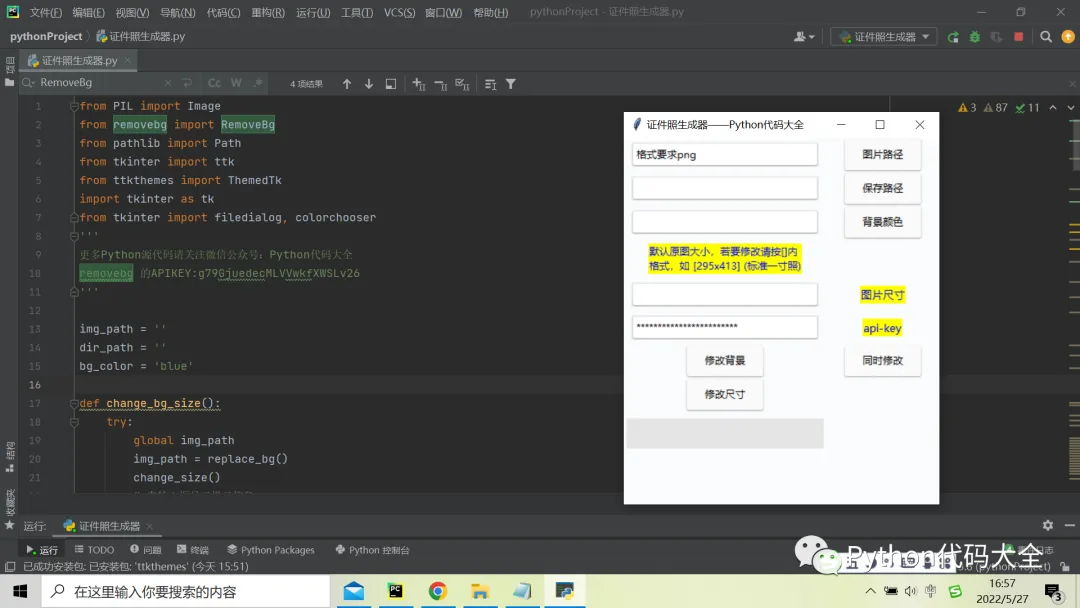
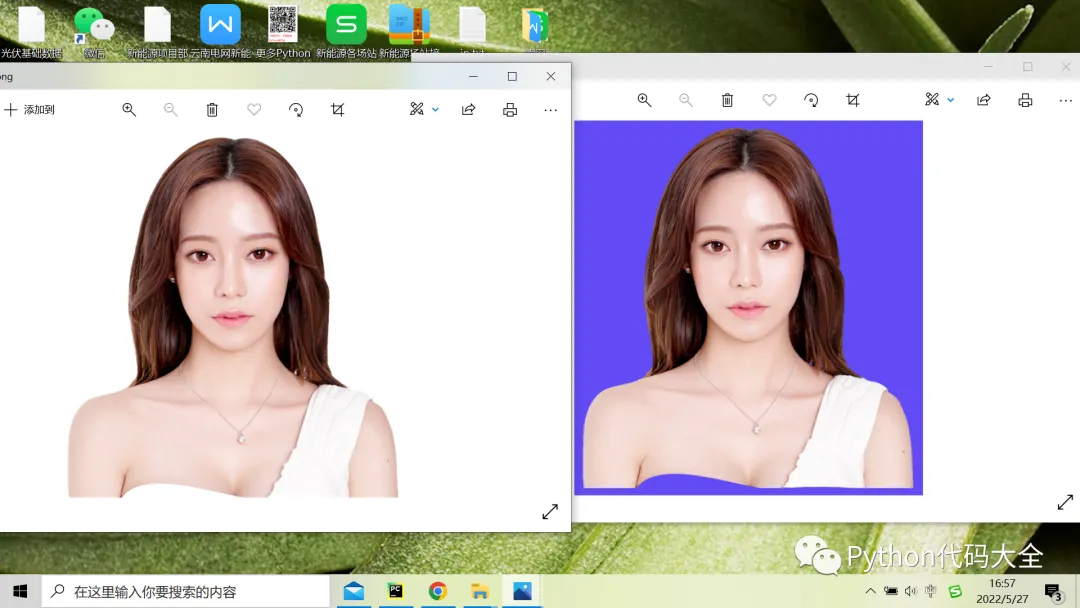
核心程序代码
from PIL import Imagefrom removebg import RemoveBgfrom pathlib import Pathfrom tkinter import ttkfrom ttkthemes import ThemedTkimport tkinter as tkfrom tkinter import filedialog, colorchooser'''removebg 的APIKEY:g79GjuedecMLVVwkfXWSLv26'''img_path = ''dir_path = ''bg_color = 'blue'def change_bg_size():try:global img_pathimg_path = replace_bg()change_size()# 在输出框显示提示信息tree.heading("#0", text="成功修改背景与大小!")except Exception as e:# 显示错误信息tree.heading("#0", text=e)# 修改照片背景色def replace_bg():api_key = entry5.get()# 在程序当前目录创建一个error.log文件来保存错误信息(必要参数)Path('error.log').touch()rmbg = RemoveBg(api_key, 'error.log')# 执行后会在 read_path 同级文件夹内生成一张 xxx_no_bg.png 的图片rmbg.remove_background_from_img_file(img_path)img_no_bg = Image.open(Path(str(img_path) + '_no_bg.png'))# 创建一个新的图像,RGB代表真色彩,3通道,# color可以为颜色英文名 red 或是 十六进制颜色代码 #00FF00new_img = Image.new('RGB', img_no_bg.size, color=bg_color)# 将没有背景的图像粘贴到含背景色的图像上new_img.paste(img_no_bg, (0, 0, *img_no_bg.size), img_no_bg)save_path = Path(dir_path, str(img_path.name).split('.')[0] + 'replace_bg.png')new_img.save(save_path)return save_pathtree.heading("#0", text="图片已生成!")# 修改照片尺寸def change_size():width, height = entry4.get().split('x')image = Image.open(img_path)resized_image = image.resize((int(width), int(height)), Image.ANTIALIAS)resized_image.save(Path(dir_path, str(img_path.name).split('.')[0] + '_change_size.png'))tree.heading("#0", text="尺寸修改成功!")# change_bgcolor('证件.png', 'p1_bg.png', 'oRdiK39HgoxdFE1A8QbL7wpF', 'red')def selectFilePath():global img_path# 选择文件path接收文件地址img_path = Path(filedialog.askopenfilename(title='选择原图片'))x, y = Image.open(img_path).sizeentry4.insert(0, str(x) + 'x' + str(y))path1.set(img_path)def selectDirPath():global dir_path# 选择文件path接收文件地址dir_path = Path(filedialog.askdirectory(title='选择图片保存路径'))path2.set(dir_path)def ChooseColor():global bg_color# 返回两种格式的颜色代码,这里只保存十六进制的_, bg_color = colorchooser.askcolor(title='颜色选择器')path3.set(bg_color)window = ThemedTk(theme="adapta", fonts=True, themebg=True)window.title('证件照生成器——Python代码大全')label_style = ttk.Style()label_style.configure("one.TLabel", font=("微软雅黑", 16, 'bold'), foreground="red", background="yellow")label_style1 = ttk.Style()label_style1.configure("two.TLabel", font=("微软雅黑", 9), foreground="blue", background="yellow")label_style2 = ttk.Style()label_style2.configure("three.TLabel", font=("微软雅黑", 10), foreground="blue", background="yellow")# 设置选择图片路径组件path1 = tk.StringVar()entry1 = ttk.Entry(window, textvariable=path1, width=30)entry1.insert(0, '格式要求png')button1 = ttk.Button(window,width=10, text = "图片路径", command = selectFilePath)# 设置选择文件保存路径组件path2 = tk.StringVar()entry2 = ttk.Entry(window, textvariable=path2, width=30)button2 = ttk.Button(window,width=10, text = "保存路径", command = selectDirPath)# 设置选择背景颜色组件path3 = tk.StringVar()entry3 = ttk.Entry(window, textvariable=path3, width=30)button3 = ttk.Button(window, text='背景颜色', command=ChooseColor)# 设置图片大小,默认原图大小,格式如295x413(标准一寸)label = ttk.Label(window, text='默认原图大小,若要修改请按[]内\格式,如 [295x413] (标准一寸照)', wraplength=200, style='two.TLabel')entry4 = ttk.Entry(window, width=30)label1 = ttk.Label(window, text='图片尺寸', style='three.TLabel')# 填写api-keymoren = tk.StringVar(value='g79GjuedecMLVVwkfXWSLv26') #默认apiKeyentry5 = ttk.Entry(window, width=30, textvariable=moren,show="*")label2 = ttk.Label(window, text='api-key', style='three.TLabel')# 添加“同时修改”按钮button4 = ttk.Button(window, text = "同时修改", command=change_bg_size)# 添加“修改背景”按钮button5 = ttk.Button(window, text = "修改背景", command=replace_bg)# 添加“修改尺寸”按钮button6 = ttk.Button(window, text = "修改尺寸", command=change_size)# 添加输出框显示tree = ttk.Treeview(height=1, show=("tree", "headings"))#main_label.grid(row = 0, column = 0, pady=5)entry1.grid(row = 1, column = 0, pady=5)button1.grid(row = 1, column = 1, padx=20)entry2.grid(row = 2, column = 0, pady=5)button2.grid(row = 2, column = 1, padx=20)entry3.grid(row = 3, column = 0, pady=5)button3.grid(row = 3, column = 1, padx=20)label.grid(row = 4, column = 0, pady=5)entry4.grid(row = 5, column = 0, pady=5)label1.grid(row = 5, column = 1, pady=5)entry5.grid(row = 6, column = 0, pady=5)label2.grid(row = 6, column = 1, pady=5)button4.grid(row = 7, column = 1, padx=5)button5.grid(row = 7, column = 0, padx=5)button6.grid(row = 8, column = 0, padx=5)tree.grid(row=9, column=0, pady=5)window.mainloop()
完整代码下载地址:
https://download.csdn.net/download/weixin_42756970/85474989
本文来自网友投稿或网络内容,如有侵犯您的权益请联系我们删除,联系邮箱:wyl860211@qq.com 。

