小程序跨端——浅谈小程序代码编译过程
- 2026-09-22 08:52:06
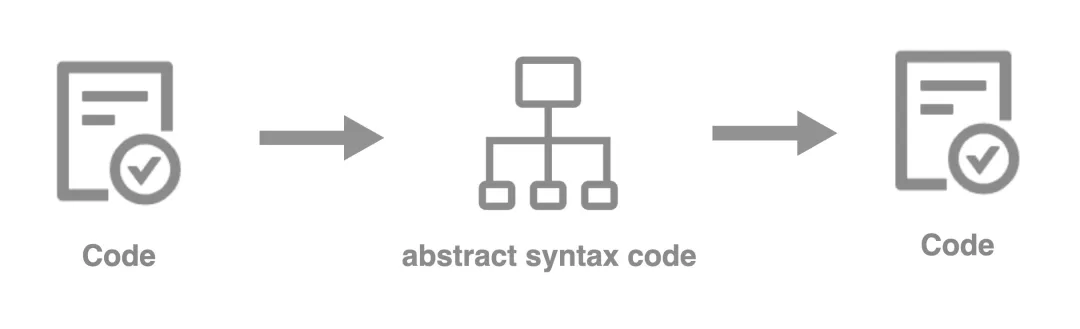
01
前言
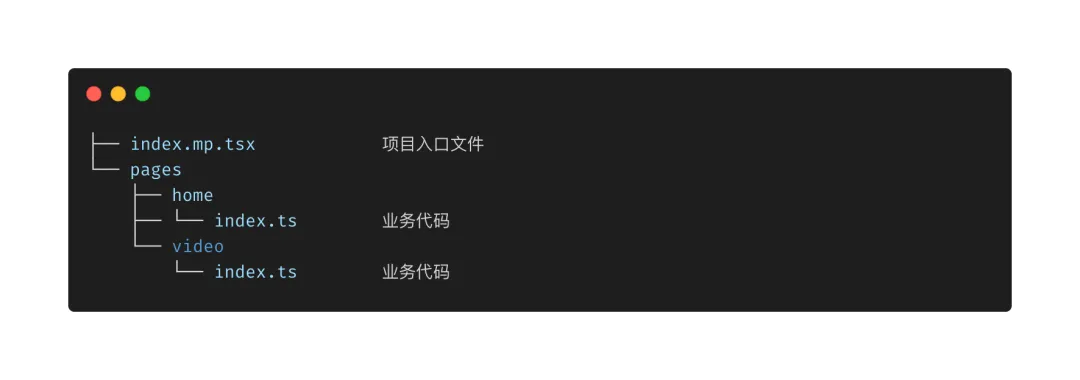
编译前:
编译后:
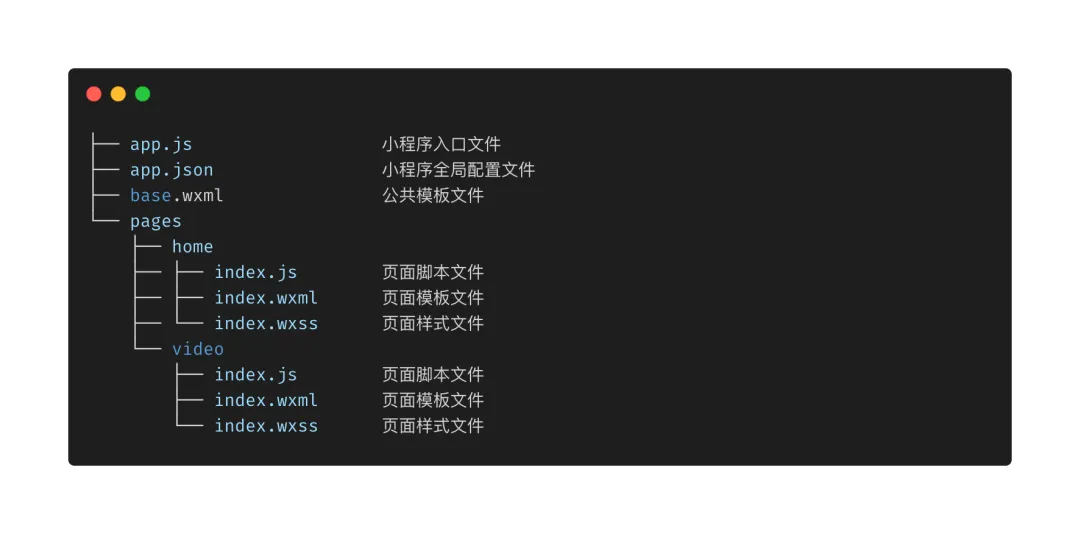
写过小程序的同学应该能发现编译后的目录结构跟小程序的标准目录结构基本相同。
02
现状
// src/index.mp.tsximport React from 'react';import { Router, Route, TabRouter } from 'third-party/framework';import Home from './pages/home/index';import Video from './pages/video/index';class Index extends React.Component {render() {return (<><Router><TabRouter text="Home"><Route name='Home' component={Home} /></TabRouter><TabRouter text="Video"><Route name='Video' component={Video} /></TabRouter></Router>{this.props.children}</>);}}export default Index;
业务代码:
// src/pages/home/index.jsximport React from 'react';import { View, Text } from 'react-native';export default () => {return (<View style={{ ... }}><Text style={{ ... }}>Hello terminus.</Text></View>);}
以上只是实例代码,在实际业务场景中页面数量更多且复杂度更高,虽然这些不会成为影响本篇内容的因素。
03
目标
要想将以上业务代码在小程序端正常运行和渲染,则必须要经过编译和转换。从 JSX 到小程序代码的编译过程大致如下图所示:
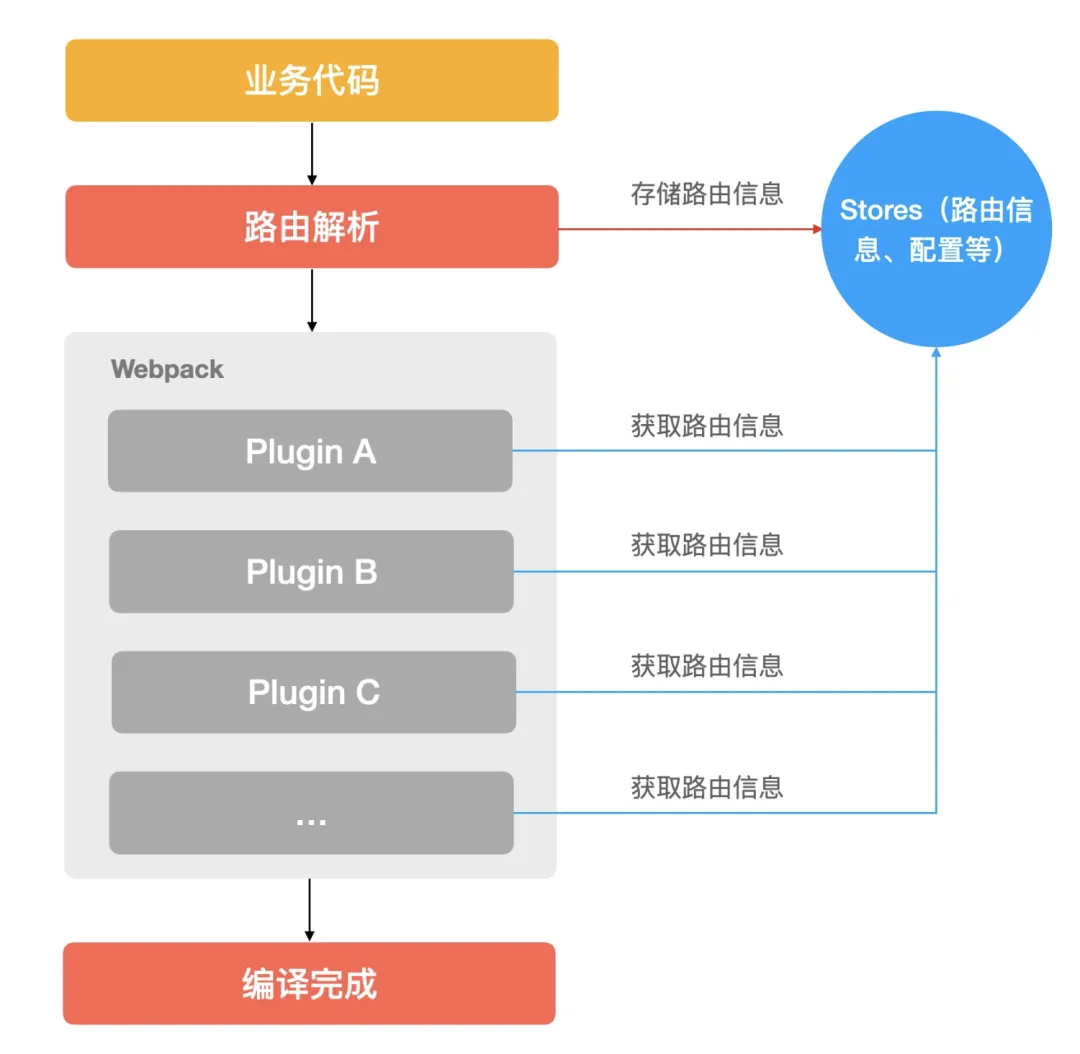
其中最核心、最复杂的部分莫过于各种各样的 Webpack 插件,每个插件都有各自的分工,比如:拷贝静态资源、模板生成、虚拟模块的管理等等。
04
解析路由
import { Router, Route, TabRouter } from 'third-party/framework';import Home from './pages/home/index';import Video from './pages/video/index';class Index extends React.Component {render() {return (<><Router><TabRouter text="Home"><Route name='Home' component={Home} /></TabRouter><TabRouter text="Video"><Route name='Video' component={Video} /></TabRouter></Router>{this.props.children}</>);}}export default Index;
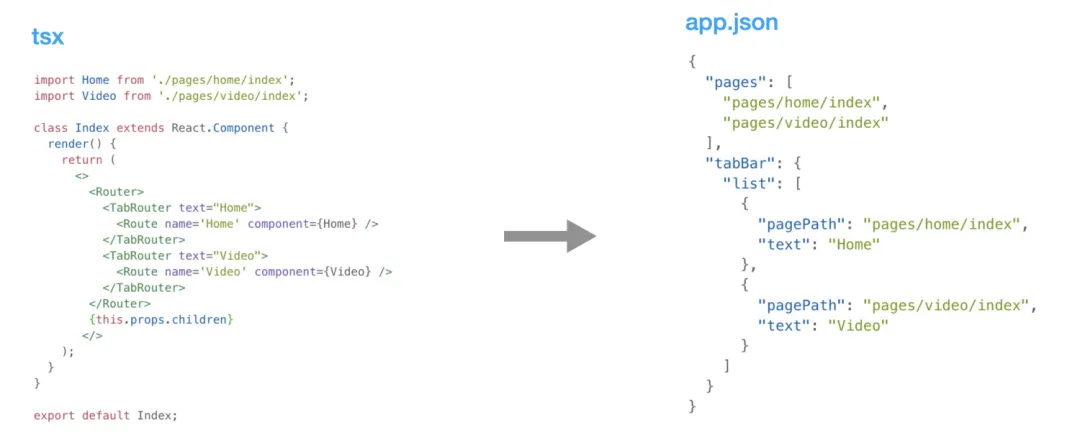
再来看一下小程序的 app.json 配置示例(以微信小程序为例):
{"pages": ["pages/home/index","pages/video/index"],"tabBar": {"list": [{"pagePath": "pages/home/index","text": "Home"},{"pagePath": "pages/video/index","text": "Video"}]}}
细心观察似乎发现这两者潜藏着一些关系:
pages 中的项和 pagePath 的值是 component 对应的 value;
tabBar 项的 text 字段的值是 TabRouter text 属性的值;
// plugins/babel-router-plugin.tsexport default {pre() {// 每次解析前清空之前的结果,避免路由重复。},post() {// 解析完后把结果存储起来,后面需要用到。},visitor: {ImportDeclaration({ node: { specifiers, source } }) {// 把引用的路径存起来,用于后续生成文件时使用。},ReturnStatement(paths) {// AST 词法分析,TabRouter 代表 TabBar,Route 代表普通路由、Subpackage 代表分包。},},}
封装一个解析路由的辅助方法,在其内部调用上面的插件:
// utils/routes.tsimport path from 'path';import * as babel from '@babel/core';import jetpack from 'fs-jetpack';/*** 解析项目的路由文件,获取路由信息。* @param base workspace* @param entry 路由文件路径* @param plugins babel plugins*/export const analysis = (base: string, entry: string, plugins?: any | any[]) => {const options = {plugins: [].concat(plugins),presets: [['@babel/preset-typescript',{...}]],};return new Promise((resolve, reject) => {try {const filepath = path.resolve(base, entry);const content = jetpack.read(filepath, 'utf8');resolve(babel.transform(content, options).code);} catch (error) {reject(error);}});}
有了上面的插件和辅助方法,调用它们就能拿到对应的路由信息了。
import { analysis } from './utils/routes';import BabelRouterPlugin from './plugins/babel-router-plugin';analysis(base, 'src/index.mp.tsx', BabelRouterPlugin).then(() => {// ...});
最终我们拿到的路由信息的结构看起来像是这样:
{"pages": ["pages/home/index","pages/video/index"],"tabBar": {"list": [{"pagePath": "pages/home/index","text": "Home"},{"pagePath": "pages/video/index","text": "Video"}]}}
看起来跟上文举例用的小程序的 app.json 内容一模一样,实际上也是这样。在拿到路由信息后我们需要将这些信息存放起来,后续的过程中会用到。
05
动态生成 & 添加虚拟模块
Webpack Virtual Modules is a plugin that allows for dynamical generation of in-memory virtual modules for JavaScript builds created with webpack. When virtual module is created all the parent virtual dirs that lead to the module filename are created too. This plugin supports watch mode meaning any write to a virtual module is seen by webpack as if a real file stored on disk has changed.
摘自:webpack-virtual-modules readme.md。
2、必须调用 App 来注册小程序、必须调用 Page 注册页面。
3、页面路由信息必须在 app.json 文件中声明。
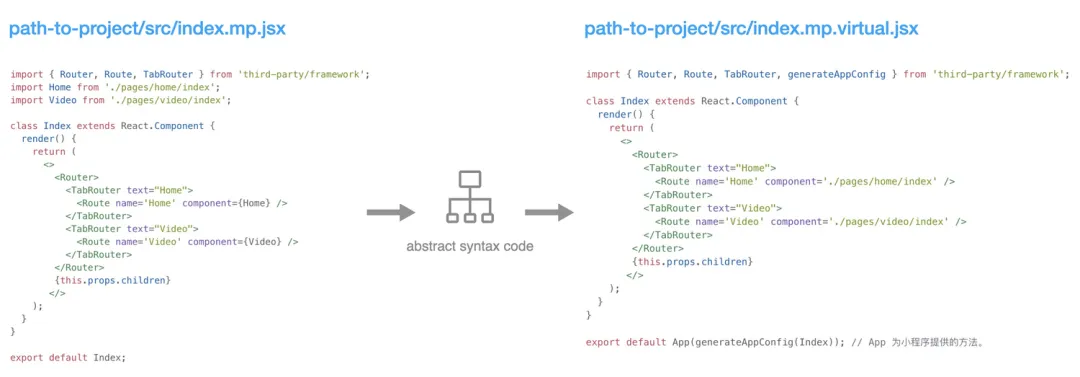
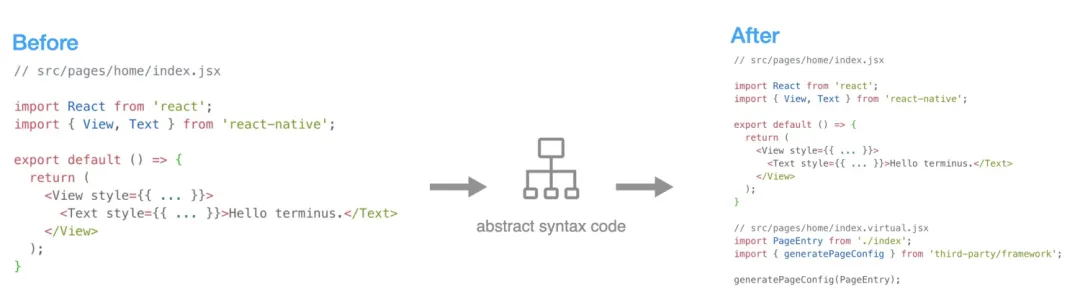
在这一步我们需要用到之前拿到的路由信息,然后把所有的路由组合成一份新的数据遍历对每个路由对应的文件做 AST、Webpack Virtual Modules 操作,最终动态加入到 Webpack 的 Entry 中。
06
生成模版文件
到目前为止,整个编译的过程已经介绍了一大半,最后一步需要生成页面的模板文件,即:index.wxml,该文件是必须存在,否则小程序会报错且无法渲染该页面的视图。
<!-- pages/home/index.wxml --><import src="/base.wxml" /> <!-- 公共模板文件 --><template is="OCTOPUS_BASE_TEMPLATE" data="{{root: root}}" />
base.wxml
<!-- helper.wxs 文件内置了一些简单的辅助函数 --><wxs src='./helper.wxs' module="helper" /><!-- 根模板,调用该模板可 --><template name="OCTOPUS_BASE_TEMPLATE"><!-- root 为一棵完整的 VNode tree --><block wx:for="{{root.cn}}" wx:key="id"><template is="OCTOPUS_1_CONTAINER" data="{{i: item, ancestor: ''}}" /></block></template><template name="oc_button"><button id="{{helper.v(i['id'])}}" bindtap="eh" ...><block wx:for="{{i.cn}}" wx:key="id"><template is="{{'OCTOPUS_' + (tid + 1) + '_CONTAINER'}}" data="{{i: item, ancestor: ancestor + ',' + i.typ, tid: tid + 1 }}" /></block></button></template>...<template name="OCTOPUS_1_CONTAINER" data="{{i: i}}"><template is="{{helper.tid(i.te, ancestor, i.id)}}" data="{{i: i, ancestor: ancestor + ',' + i.te, tid: 1 }}" /></template><template name="OCTOPUS_2_CONTAINER" data="{{i: i}}"><template is="{{helper.tid(i.te, ancestor, i.id)}}" data="{{i: i, ancestor: ancestor + ',' + i.te, tid: 1 }}" /></template>...
列举一份完整的小程序组件和组件属性的数据;
一个适合你的模板引擎;
在 webpack 的插件中调用模板引擎编译出对应的模板内容并生成到指定的位置。
07
开始启动编译
WebpackEntryProcesserPlugin --> 动态生成 & 添加虚拟模块章节,用于处理源代码。
WebpackTemplateGeneatorPlugin --> 生成模板文件章节,用于生成页面和公共模板文件。
import webpack from 'webpack';import { analysis } from './utils/routes';import BabelRouterPlugin from './plugins/babel-router-plugin';import WebpackEntryProcesserPlugin from './plugins/webpack-entry-processer-plugin';import WebpackTemplateGeneatorPlugin from './plugins/webpack-template-generator-plugin';const getWebpackConfig = (...args) => {return {...,plugins: [new WebpackEntryProcesserPlugin(),new WebpackTemplateGeneatorPlugin(),...],};};const build = async ({ target, debug, watch, base, zip, compress, progress }) => {analysis(base, 'src/index.mp.tsx', BabelRouterPlugin).then(() => {const compiler = webpack(getWebpackConfig({ ... }));if (watch === true) {compiler.watch({// 注意:监听文件时应忽略虚拟模块,否则会陷入死循环ignored: ['**/**.virtual.ts',...],}, () => {// Skip...});} else {// Skip...}});});
08
小结
解析出业务代码中的路由,暂存起来;
根据路由信息在对应的路径做 AST 的操作修改代码并生成新的虚拟模块,然后动态加入到 Webpack 的 Entry 中;
生成对应的页面模板文件和公共模板文件。
作者/蒋毅强
编辑/端点技术星球

