基于微信原生小程序搭建的SBTI人格测试小程序(附源码)
- 2026-09-25 11:13:50
基于微信原生小程序搭建的SBTI人格测试小程序(附源码)二、前端实现 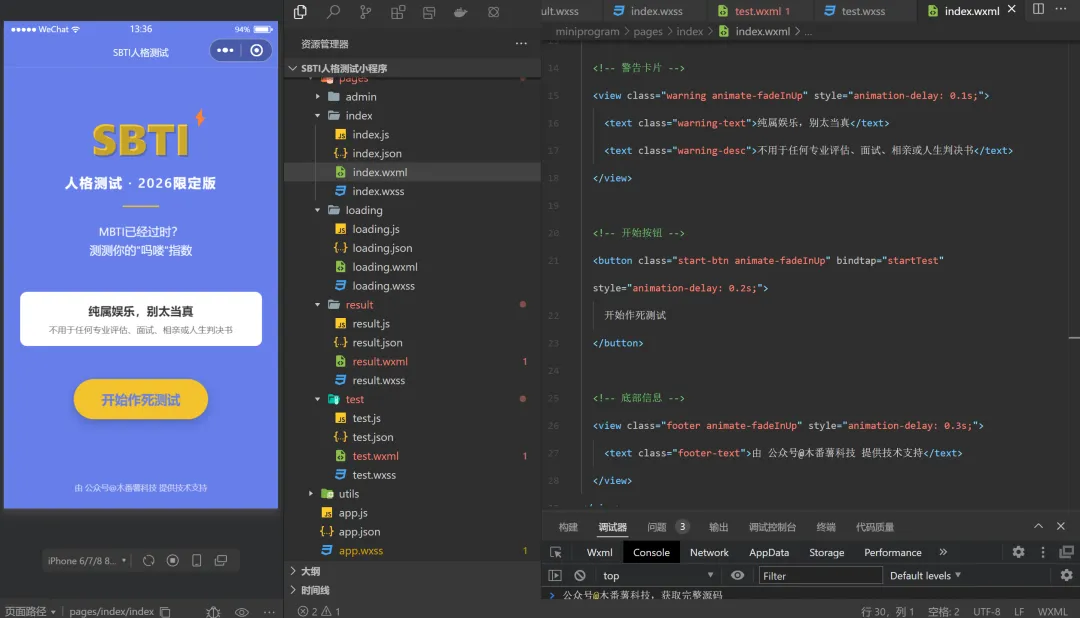
一、项目结构
sbti-miniprogram/├── miniprogram/│ ├── pages/│ │ ├── index/ # 启动页│ │ ├── test/ # 答题页│ │ └── result/ # 结果页│ ├── components/ # 公共组件│ ├── utils/ # 工具函数│ ├── app.js│ ├── app.json│ └── app.wxss└── project.config.json
1. app.js - 小程序入口
// miniprogram/app.jsApp({onLaunch: function() {if (!wx.cloud) {console.error('请使用 2.2.3 或以上的基础库以使用云能力')} else {wx.cloud.init({env: 'your-env-id', // 替换为你的云环境IDtraceUser: true})}},globalData: {userInfo: null,answers: [] // 存储用户答案}})
2. app.json - 全局配置
{"pages": ["pages/index/index","pages/test/test","pages/result/result"],"window": {"navigationBarBackgroundColor": "#FF6B6B","navigationBarTitleText": "SBTI人格测试","navigationBarTextStyle": "white","backgroundColor": "#F5F5F5"},"style": "v2","sitemapLocation": "sitemap.json"}
3. pages/index/index.wxml - 首页
<viewclass="container"><!-- Logo区域 --><viewclass="hero animate-fadeInUp"><viewclass="logo-wrapper"><textclass="title text-gradient">SBTI</text><textclass="lightning animate-pulse">⚡</text></view><textclass="subtitle">人格测试 · 2026限定版</text><viewclass="divider"></view><textclass="description">MBTI已经过时?</text><textclass="description">测测你的"吗喽"指数</text></view><!-- 警告卡片 --><viewclass="warning animate-fadeInUp"style="animation-delay: 0.1s;"><textclass="warning-text">纯属娱乐,别太当真</text><textclass="warning-desc">不用于任何专业评估、面试、相亲或人生判决书</text></view><!-- 开始按钮 --><buttonclass="start-btn animate-fadeInUp"bindtap="startTest"style="animation-delay: 0.2s;">开始作死测试</button><!-- 底部信息 --><viewclass="footer animate-fadeInUp"style="animation-delay: 0.3s;"><textclass="footer-text">由 公众号@木番薯科技 提供技术支持</text></view></view>
4. pages/index/index.wxss - 首页样式
/* miniprogram/pages/index/index.wxss */.container {min-height: 100vh;background: linear-gradient(135deg, #667eea 0%, #764ba2 100%);display: flex;flex-direction: column;align-items: center;padding: 60rpx 40rpx;}.hero {text-align: center;margin-top: 120rpx;margin-bottom: 80rpx;}.title {display: block;font-size: 96rpx;font-weight: bold;color: #FFE66D;text-shadow: 4rpx 4rpx 0 rgba(0,0,0,0.2);margin-bottom: 20rpx;}.subtitle {display: block;font-size: 36rpx;color: #FFFFFF;margin-bottom: 40rpx;}.divider {width: 100rpx;height: 4rpx;background: #FFE66D;margin: 40rpx auto;}.description {display: block;font-size: 32rpx;color: #FFFFFF;line-height: 1.6;opacity: 0.95;}.warning {background: rgba(255, 230, 109, 0.95);border-radius: 20rpx;padding: 30rpx;margin: 60rpx 0;text-align: center;}.warning-icon {font-size: 48rpx;display: block;margin-bottom: 20rpx;}.warning-text {display: block;font-size: 32rpx;font-weight: bold;color: #333;margin-bottom: 15rpx;}.warning-desc {display: block;font-size: 24rpx;color: #666;}.start-btn {width: 80%;background: #FFE66D;color: #667eea;font-size: 36rpx;font-weight: bold;border-radius: 60rpx;margin-top: 60rpx;box-shadow: 0 10rpx 30rpx rgba(0,0,0,0.2);}.footer {position: fixed;bottom: 40rpx;text-align: center;width: 100%;}.footer-text {display: block;font-size: 22rpx;color: rgba(255,255,255,0.7);line-height: 1.5;}
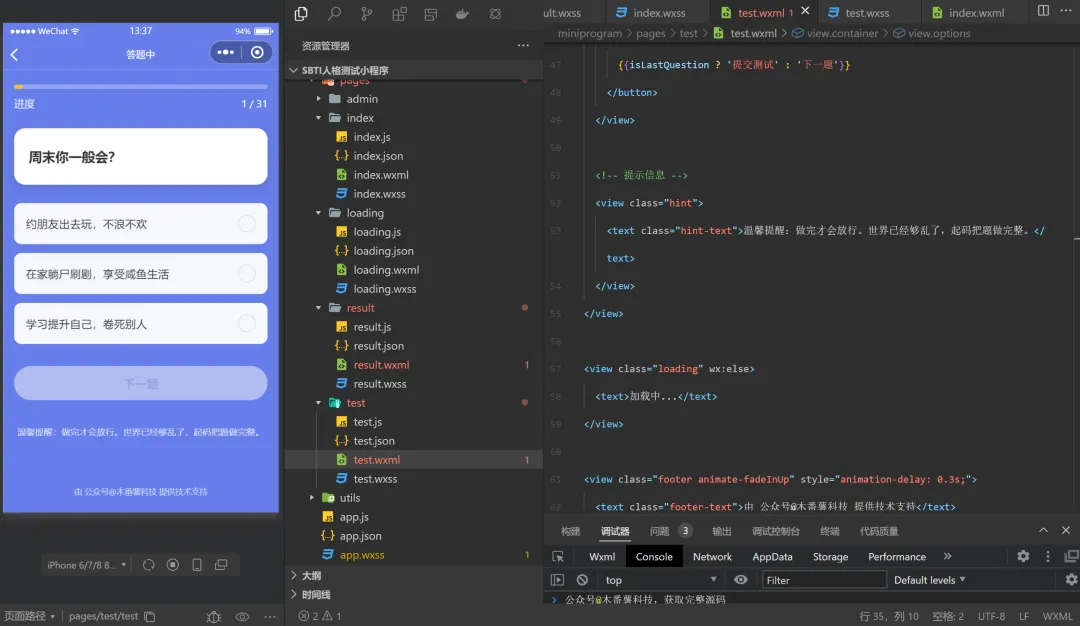
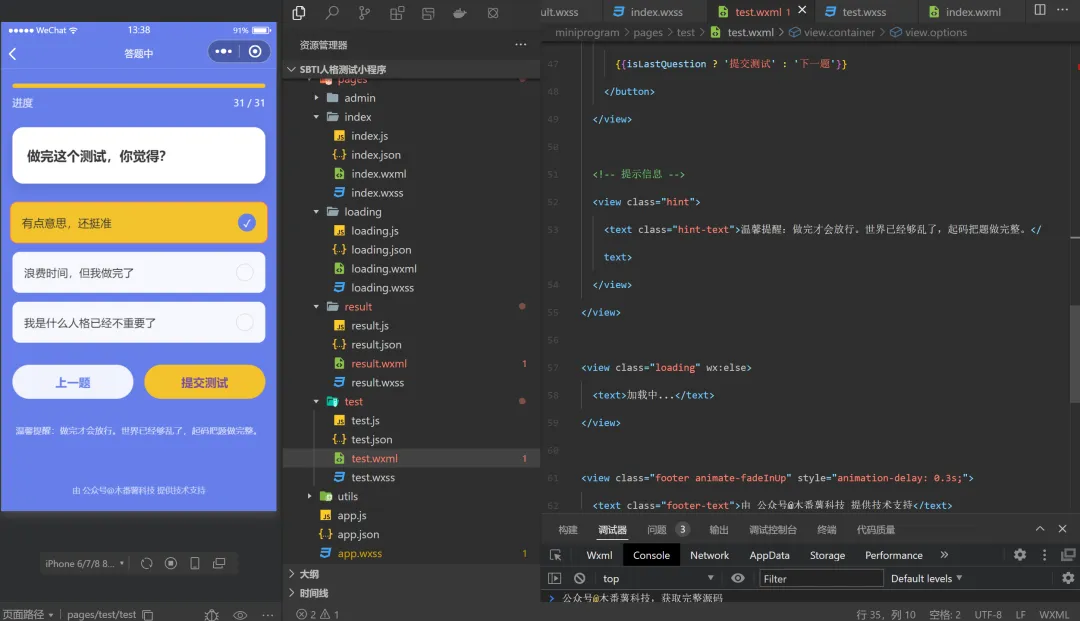
5. pages/test/test.wxml - 答题页
<viewclass="container"wx:if="{{currentQuestion}}"><!-- 进度区域 --><viewclass="progress-section"><viewclass="progress-bar"><viewclass="progress-fill"style="width: {{progressPercent}}%"></view></view><viewclass="progress-info"><textclass="progress-label">进度</text><textclass="progress-text">{{currentIndex}} / {{totalQuestions}}</text></view></view><!-- 题目卡片 --><viewclass="question-card"><textclass="question-text">{{currentQuestion.text}}</text></view><!-- 选项区域 --><viewclass="options"><viewclass="option-item {{selectedOption === item.id ? 'selected' : ''}}"wx:for="{{currentQuestion.options}}"wx:key="id"bindtap="selectOption"data-option="{{item}}"><textclass="option-text">{{item.text}}</text><viewclass="option-check.active"wx:if="{{selectedOption === item.id}}"><text>✓</text></view><viewclass="option-check"wx:else><text></text></view></view></view><!-- 按钮区域 --><viewclass="button-group"><buttonclass="btn-prev"bindtap="prevQuestion"wx:if="{{currentIndex > 1}}">上一题</button><buttonclass="btn-next {{selectedOption ? '' : 'disabled'}}"bindtap="nextOrSubmit"disabled="{{!selectedOption}}">{{isLastQuestion ? '提交测试' : '下一题'}}</button></view><!-- 提示信息 --><viewclass="hint"><textclass="hint-text">温馨提醒:做完才会放行。世界已经够乱了,起码把题做完整。</text></view></view><viewclass="loading"wx:else><text>加载中...</text></view><viewclass="footer animate-fadeInUp"style="animation-delay: 0.3s;"><textclass="footer-text">由 公众号@木番薯科技 提供技术支持</text></view>
6. pages/test/test.wxss - 答题页样式
/* miniprogram/pages/test/test.wxss */.container {min-height: 100vh;background: linear-gradient(135deg, #667eea 0%, #764ba2 100%);padding: 40rpx 30rpx;}.progress-section {margin-bottom: 50rpx;}.progress-bar {width: 100%;height: 12rpx;background: rgba(255,255,255,0.3);border-radius: 12rpx;overflow: hidden;margin-bottom: 20rpx;}.progress-fill {height: 100%;background: #FFE66D;border-radius: 12rpx;transition: width 0.3s ease;}.progress-text {display: block;text-align: center;color: #FFFFFF;font-size: 28rpx;}.question-card {background: #FFFFFF;border-radius: 30rpx;padding: 50rpx 40rpx;margin-bottom: 50rpx;box-shadow: 0 10rpx 30rpx rgba(0,0,0,0.1);}.question-text {font-size: 36rpx;font-weight: bold;color: #333;line-height: 1.5;}.options {margin-bottom: 60rpx;}.option-item {background: rgba(255,255,255,0.95);border-radius: 20rpx;padding: 30rpx;margin-bottom: 25rpx;display: flex;justify-content: space-between;align-items: center;transition: all 0.3s ease;border: 3rpx solid transparent;}.option-item.selected {background: #FFE66D;border-color: #FF6B6B;transform: scale(1.02);}.option-text {font-size: 30rpx;color: #333;flex: 1;}.option-check {width: 44rpx;height: 44rpx;background: #FF6B6B;border-radius: 50%;display: flex;align-items: center;justify-content: center;color: #FFFFFF;font-size: 32rpx;}.button-group {display: flex;gap: 30rpx;margin-bottom: 40rpx;}.btn-prev, .btn-next {flex: 1;border-radius: 60rpx;font-size: 32rpx;font-weight: bold;}.btn-prev {background: rgba(255,255,255,0.9);color: #667eea;}.btn-next {background: #FFE66D;color: #667eea;}.btn-next.disabled {opacity: 0.5;}.hint {text-align: center;padding: 20rpx;}.hint-text {font-size: 24rpx;color: rgba(255,255,255,0.8);}.loading {display: flex;justify-content: center;align-items: center;height: 100vh;color: #FFFFFF;font-size: 32rpx;}
7. pages/result/result.wxml - 结果页
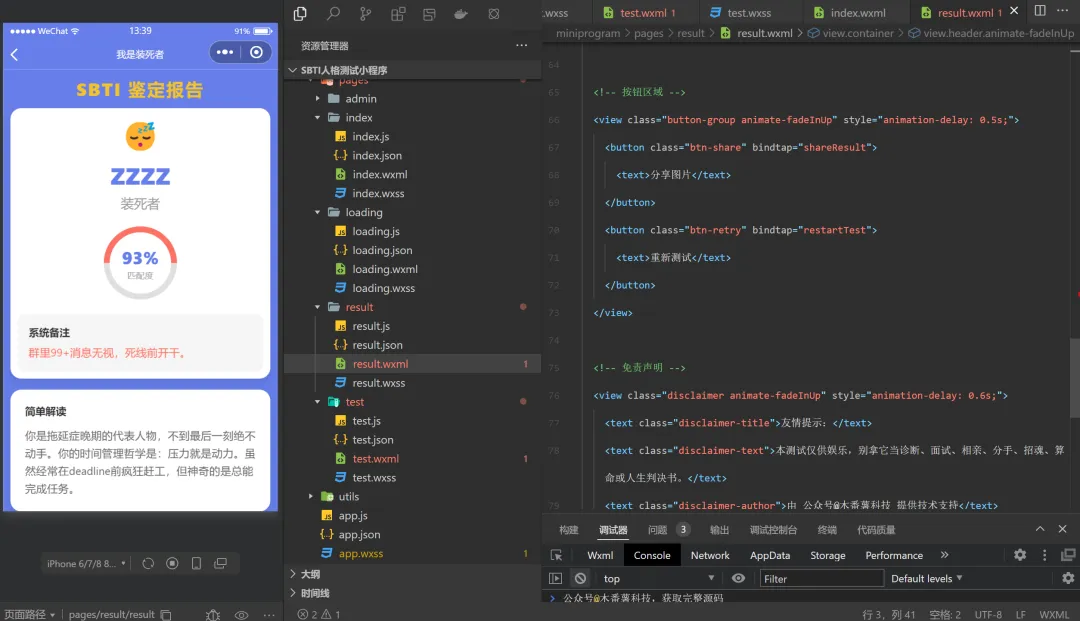
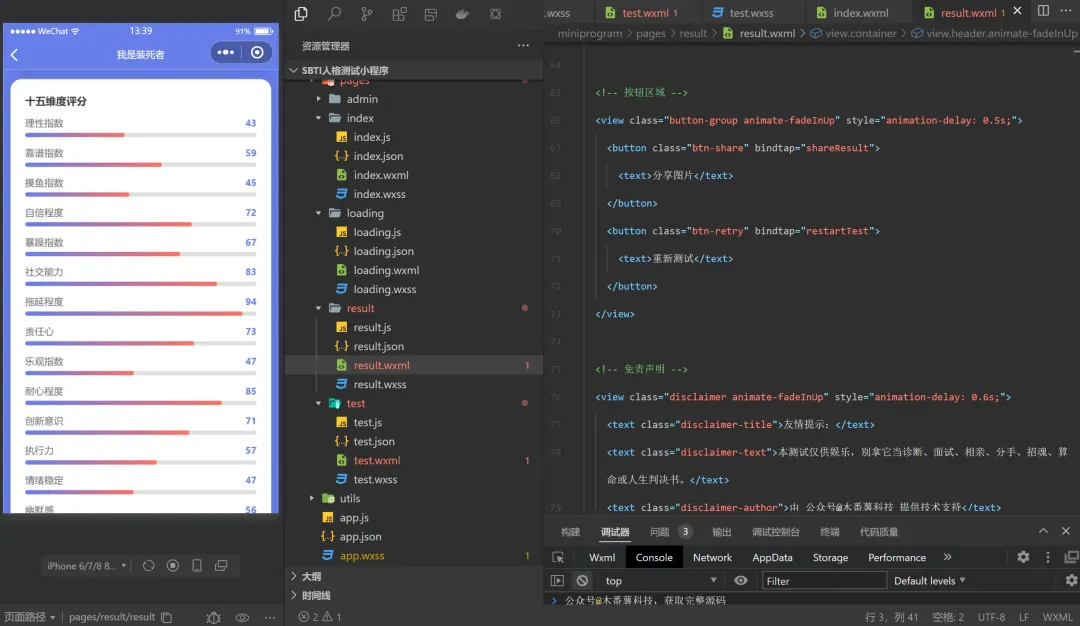
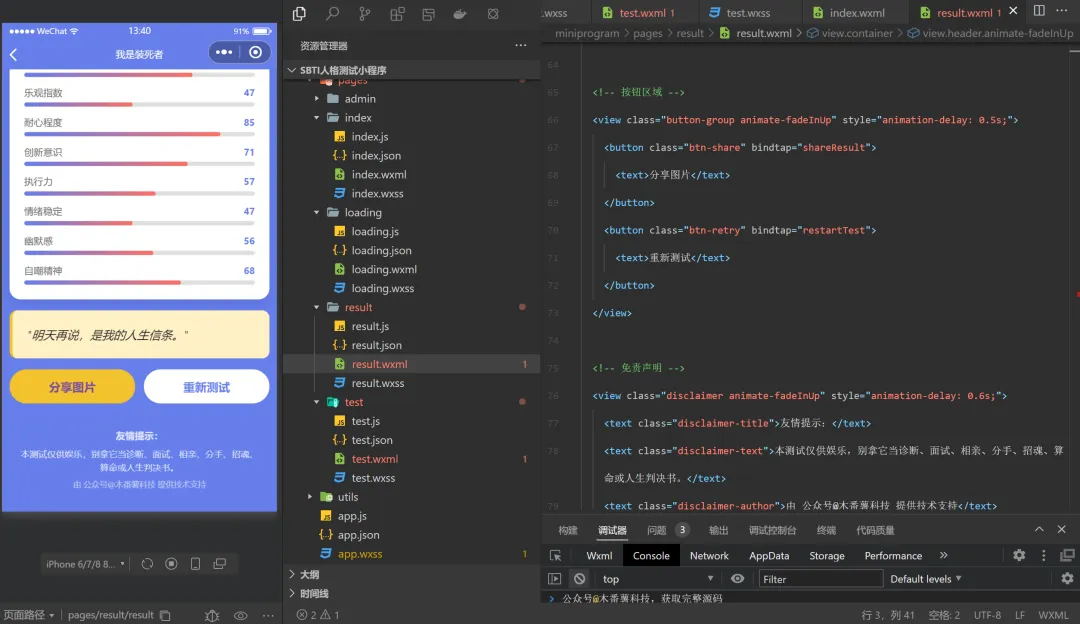
<viewclass="container"><!-- 头部标题 --><viewclass="header animate-fadeInUp"><textclass="header-title">SBTI 鉴定报告</text></view><!-- 人格卡片 --><viewclass="personality-card animate-fadeInUp"style="animation-delay: 0.1s;"><viewclass="personality-header"><textclass="personality-emoji">{{result.emoji}}</text><textclass="personality-name">{{result.name}}</text><textclass="personality-fullname">{{result.fullName}}</text></view><!-- 匹配度环形图 --><viewclass="match-section"><viewclass="match-ring"><viewclass="ring-bg"></view><viewclass="ring-fill"style="--match-rate: {{result.matchRate}}%"></view><viewclass="match-content"><textclass="match-rate">{{result.matchRate}}%</text><textclass="match-label">匹配度</text></view></view></view><!-- 毒舌点评 --><viewclass="comment-box"><textclass="comment-label">系统备注</text><textclass="comment-text">{{result.mockComment}}</text></view></view><!-- 简单解读 --><viewclass="card animate-fadeInUp"style="animation-delay: 0.2s;"><viewclass="card-header"><textclass="card-title">简单解读</text></view><textclass="description">{{result.description}}</text></view><!-- 十五维度评分 --><viewclass="card animate-fadeInUp"style="animation-delay: 0.3s;"><viewclass="card-header"><textclass="card-title">十五维度评分</text></view><viewclass="dimensions"><viewclass="dimension-item"wx:for="{{dimensionList}}"wx:key="name"><viewclass="dimension-header"><textclass="dimension-name">{{item.name}}</text><textclass="dimension-value">{{item.value}}</text></view><viewclass="dimension-bar"><viewclass="dimension-fill"style="width: {{item.value}}%"></view></view></view></view></view><!-- 分享语录 --><viewclass="quote-card animate-fadeInUp"style="animation-delay: 0.4s;"><textclass="quote-text">"{{result.shareQuote}}"</text></view><!-- 按钮区域 --><viewclass="button-group animate-fadeInUp"style="animation-delay: 0.5s;"><buttonclass="btn-share"bindtap="shareResult"><text>分享图片</text></button><buttonclass="btn-retry"bindtap="restartTest"><text>重新测试</text></button></view><!-- 免责声明 --><viewclass="disclaimer animate-fadeInUp"style="animation-delay: 0.6s;"><textclass="disclaimer-title">友情提示:</text><textclass="disclaimer-text">本测试仅供娱乐,别拿它当诊断、面试、相亲、分手、招魂、算命或人生判决书。</text><textclass="disclaimer-author">由 公众号@木番薯科技 提供技术支持</text></view></view>
8. pages/result/result.wxss - 结果页样式
/* miniprogram/pages/result/result.wxss */.container {min-height: 100vh;background: linear-gradient(135deg, #667eea 0%, #764ba2 100%);padding: 40rpx 30rpx 80rpx;}.header {text-align: center;margin-bottom: 40rpx;}.title {font-size: 48rpx;font-weight: bold;color: #FFE66D;letter-spacing: 4rpx;}.personality-card {background: #FFFFFF;border-radius: 40rpx;padding: 50rpx 40rpx;margin-bottom: 40rpx;box-shadow: 0 20rpx 40rpx rgba(0,0,0,0.15);text-align: center;}.personality-name {display: block;font-size: 64rpx;font-weight: bold;color: #FF6B6B;margin-bottom: 20rpx;}.personality-fullname {display: block;font-size: 32rpx;color: #999;margin-bottom: 40rpx;}.match-rate {margin: 40rpx 0;position: relative;}.match-label {display: block;font-size: 28rpx;color: #666;margin-bottom: 20rpx;}.match-value {display: block;font-size: 72rpx;font-weight: bold;color: #FF6B6B;}.mock-comment {background: #F5F5F5;border-radius: 20rpx;padding: 30rpx;margin-top: 30rpx;text-align: left;}.comment-label {display: block;font-size: 28rpx;font-weight: bold;color: #FF6B6B;margin-bottom: 15rpx;}.comment-text {display: block;font-size: 28rpx;color: #666;line-height: 1.6;}.description-section, .dimensions-section {background: #FFFFFF;border-radius: 30rpx;padding: 40rpx;margin-bottom: 30rpx;}.section-title {display: block;font-size: 32rpx;font-weight: bold;color: #333;margin-bottom: 30rpx;}.description-text {font-size: 28rpx;color: #666;line-height: 1.8;}.dimensions-list {margin-top: 20rpx;}.dimension-item {display: flex;align-items: center;margin-bottom: 25rpx;gap: 20rpx;}.dimension-name {width: 140rpx;font-size: 26rpx;color: #666;}.dimension-bar {flex: 1;height: 16rpx;background: #E0E0E0;border-radius: 8rpx;overflow: hidden;}.dimension-fill {height: 100%;background: linear-gradient(90deg, #FF6B6B, #FFE66D);border-radius: 8rpx;transition: width 1s ease;}.dimension-score {width: 60rpx;font-size: 26rpx;color: #FF6B6B;font-weight: bold;text-align: right;}.action-buttons {display: flex;gap: 30rpx;margin: 40rpx 0;}.btn-share, .btn-retry {flex: 1;border-radius: 60rpx;font-size: 32rpx;font-weight: bold;height: 90rpx;line-height: 90rpx;}.btn-share {background: #FFE66D;color: #667eea;}.btn-retry {background: #FFFFFF;color: #667eea;}.disclaimer {background: rgba(0,0,0,0.7);border-radius: 20rpx;padding: 30rpx;margin-top: 40rpx;text-align: center;}.disclaimer-title {display: block;font-size: 28rpx;font-weight: bold;color: #FFE66D;margin-bottom: 15rpx;}.disclaimer-text {display: block;font-size: 24rpx;color: #FFFFFF;line-height: 1.6;margin-bottom: 20rpx;}.disclaimer-author {display: block;font-size: 22rpx;color: rgba(255,255,255,0.7);}.loading {display: flex;justify-content: center;align-items: center;height: 100vh;color: #FFFFFF;font-size: 32rpx;}
三、部署步骤
1. 环境准备
注册微信小程序账号
下载微信开发者工具
2. 小程序配置
修改
app.js中的env为你的云环境ID在
project.config.json中配置正确的小程序appid
这个完整实现已经包含了核心功能,你可以下载完整代码到微信开发者工具中运行。点赞+分享+推荐+写留言后,关注回复“SBTI人格测试小程序”获取完整源码。
本文来自网友投稿或网络内容,如有侵犯您的权益请联系我们删除,联系邮箱:wyl860211@qq.com 。

