我用 AI 零代码撸了一个微信小程序:Dino Kids
- 2026-09-26 08:40:31
我用 AI 零代码撸了一个微信小程序:Dino Kids
设计、素材、组件全部由 AI 完成,免费模型 + 生图模型真香
个人开发者 + 免费 AI 模型 + Gemini 生图 = 高效产出高质量小程序
附 · Dino Kids 真实产品截图 & 核心组件代码
最近我利用业余时间开发了一款少儿英语启蒙的微信小程序 Dino Kids。
整个开发过程——从页面设计、素材背景图,到复杂的动效组件——几乎都由 AI 完成。
特别要提的是,所有图片素材(背景、彩带、按钮装饰等)均使用 Google 最新生图模型 gemini-3-pro-image-preview-2k 生成,风格统一、分辨率高,而且完全免费。
今天就把我的完整实践过程分享出来,带大家看看一个“AI 全包”的小程序长什么样。
一、产品长什么样?真实截图一览
先来看几张核心界面,感受一下 UI 和功能布局。
单词学习页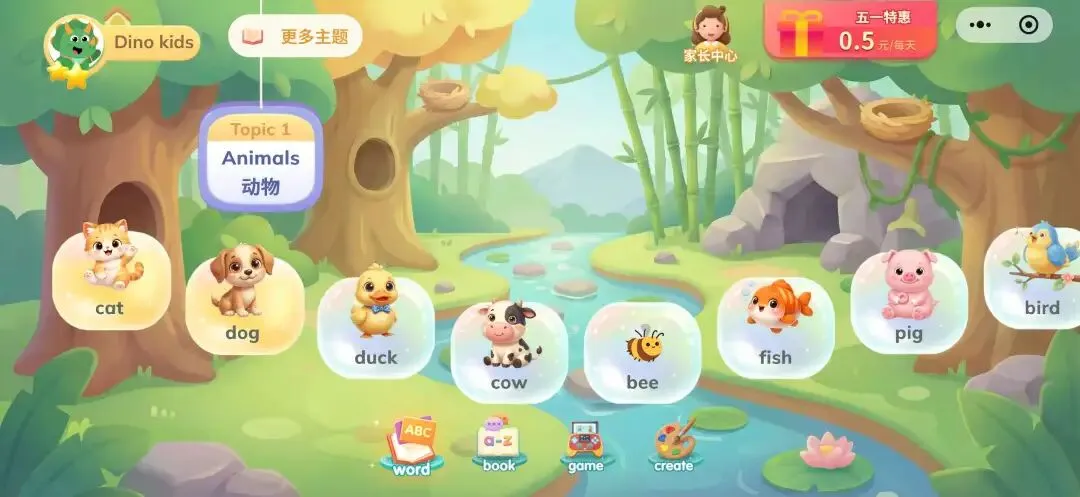 绘本馆
绘本馆 游戏中心
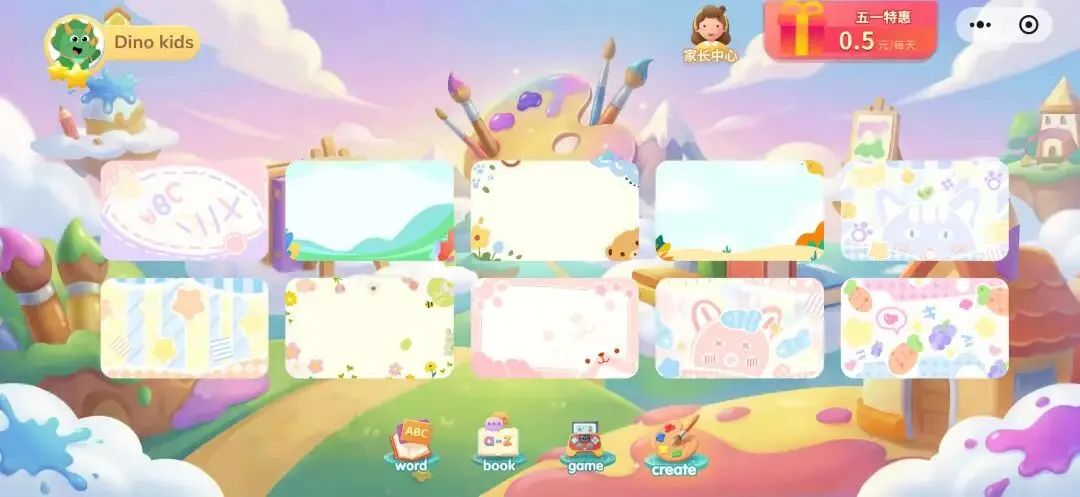
游戏中心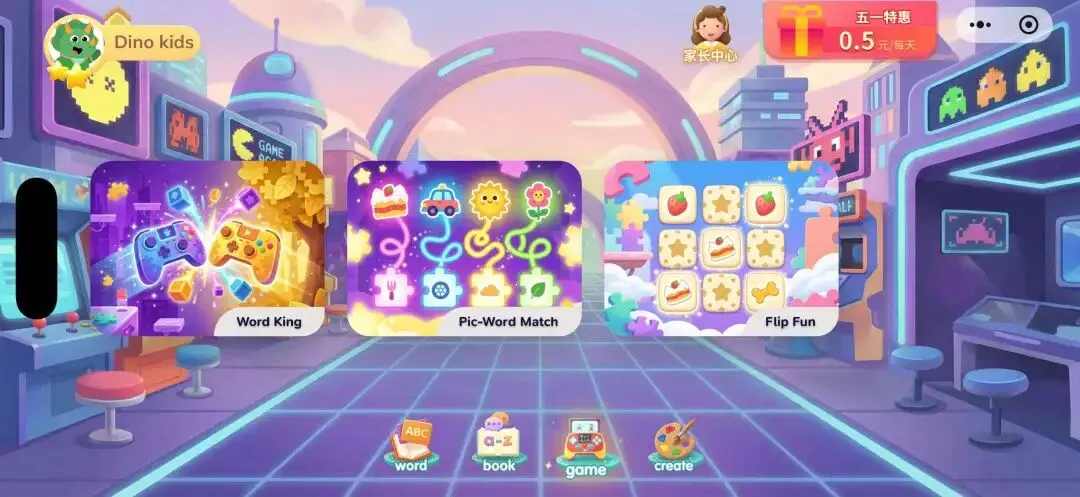 绘画/创作页
 单词学习页:以动物主题分类(cat、bird、dog、pig……),卡片式设计,点击即发音。
绘本馆:2200+ 绘本,支持蓝思值 BR-70L、新课标等级筛选,还有“上次阅读”续读功能。
游戏中心:包含 Word King、Pic-Word Match、Flip Fun 等互动小游戏。
以上所有页面中的背景纹理、动物图标、彩带素材、按钮装饰,基本使用
gemini-3-pro-image-preview-2k逐张生成或批量生成的。下文会细说。
体验入口

二、我用到的 AI 模型全家桶
2.1 聊天/代码生成模型(免费主力)
我主要使用 arena.ai 平台,右侧选择模型直接对话:
Gemini 3 Flash(免费,响应快) GLM 5.1(免费,中文理解好) GPT-5.2(免费,逻辑严谨)
这些模型帮我生成了 90% 的前端代码,包括两个核心动效组件(Lottie 和礼花粒子系统)。
2.2 图片生成模型(素材全靠它)
gemini-3-pro-image-preview-2k
这是 Google 目前最强的图像生成模型,支持 2K 分辨率,提示词遵循度极高。
我用它生成了:
单词卡片上的动物形象(保持一致的扁平可爱风格) 绘本馆的装饰 banner 和 2200+ 绘本的封面占位图(批量生成) 礼花组件里的 30 张彩带 PNG 序列帧 底部导航的纯图标( ABC/word/book/game/create)
生成示例提示词:
“Generate a cute cartoon bee, simple flat style, isolated on transparent background, 2K resolution, suitable for a kids’ language learning app.”
输出直接是带透明通道的 PNG,省去了抠图的麻烦。
2.3 国内调用国外模型 API(可选需付费)
如果你需要批量生成代码(比如生成所有列表页的骨架),可以使用 api.bananan.cn/pricing
价格约 0.02 元/次调用,支持 GPT-5.2、Gemini 等。
三、AI 帮我写的三个个“高颜值”组件(附完整代码)
3.1 Lottie 动画组件(支持 JSON 动效,自动管理生命周期)
微信小程序原生集成 Lottie 比较麻烦,需要处理 canvas 2d 上下文、页面隐藏/显示、内存释放。我把需求扔给 AI,它直接生成了一套完整的组件。
<!-- 组件名:GlLottie -->
<template>
<viewclass="gl-lottie">
<canvas:id="canvasId"type="2d"class="gl-lottie-canvas" @click="handleCanvasClick"></canvas>
</view>
</template>

<scriptsetup>
import { nextTick, onUnmounted, getCurrentInstance, watch, markRaw } from'vue'
import { onPageShow, onPageHide } from'@dcloudio/uni-app';
import { getNodeEL } from'@/utils/index.js';
import lottie from"lottie-miniprogram";

const instance = getCurrentInstance();
const emit = defineEmits(['load', 'click']);
const props = defineProps({
url: { type: String, required: true },
options: { type: Object, default: {} },
data: { type: Object, default: {} }
});

const canvasId = `lottie-${instance.uid}-${Math.floor(Math.random() * 1000)}`;
let control = null, isDestroyed = false, indexId = 0;

watch(() => props.url, (newUrl) => {
  destroy();
if (newUrl) nextTick(() => init());
}, { immediate: true });

asyncfunctioninit() {
if (!props.url) return;
const initId = ++indexId;
  isDestroyed = false;

let animationData = null;
if (props.url.toLowerCase().includes('http')) {
const res = await uni.request({ url: props.url });
if (res.statusCode === 200 && res.data) animationData = JSON.parse(JSON.stringify(res.data));
  }
if (isDestroyed || initId !== indexId) return;

let canvasEl = await getNodeEL(`#${canvasId}`, instance);
if (!canvasEl) return;
const canvas = canvasEl.node;
const context = canvas.getContext('2d');
const dpr = wx.getWindowInfo().pixelRatio;
  canvas.width = canvasEl.width * dpr;
  canvas.height = canvasEl.height * dpr;
  context.scale(dpr, dpr);

const config = {
renderer: 'canvas',
rendererSettings: { clearCanvas: true, context, canvas, scale: 1 },
loop: props.options.loop ?? true,
autoplay: props.options.autoplay ?? true,
  };
if (animationData) config.animationData = markRaw(animationData);
else config.url = props.url;

if (isDestroyed || initId !== indexId) return;
  lottie.setup(canvas);
  control = lottie.loadAnimation(config);
  control.setSubframe(false);
  emit('load', canvasEl, { control: markRaw(control), url: props.url, data: props.data });
}

functiondestroy() {
  isDestroyed = true;
if (control) {
    control.stop();
    control.destroy();
    control = null;
  }
}

onPageHide(() => control && control.pause());
onPageShow(() => control && props.options.autoplay !== false && control.play());
onUnmounted(() => destroy());
</script>

<stylescoped>
.gl-lottie { width: 100%; height: 100%; position: relative; }
.gl-lottie-canvas { width: 100%; height: 100%; will-change: transform; transform: translateZ(0); }
</style>
3.2 Svga 加载组件
<template>
<viewclass="gu-svga">
<canvas:id="canvasId"type="2d"class="gu-svga-canvas" @click="handleCanvasClick" ></canvas>
</view>
</template>

<scriptsetup>
defineOptions({
name: "GuSvga"
})
import { nextTick, onUnmounted, getCurrentInstance, watch, markRaw} from'vue'
import { getNodeEL } from'@/utils/index.js';
import {Parser,Player} from'svgaplayer-weapp'
const instance = getCurrentInstance(); // 获取当前组件实例

const emit = defineEmits(['load', 'click', 'finished']);

const props = defineProps({
// svga网络地址/相对地址(只能是svg)
url: {
type: String,
default: '',
required: true
  },
options: {
type: Object,
default: {}
 },
// 数据对象
data: {
type: Object,
default: {}
  }
});

// 生成唯一ID防止组件冲突
const canvasId = `svga-${instance.uid}-${Math.floor(Math.random() * 1000)}`;

let canvas = null// canvas容器
let player = null// 动画控制对象
let parser = null// 加载器
let video = null// 媒体数据
let isDestroyed = false// 标志位
let indexId = 0
watch(
() => props.url,
 (newUrl, oldUrl) => {
// 先销毁旧动画(避免内存泄漏)
  destroy();
// 确保 url 有效(非空)再初始化
if (newUrl) {
// 延迟初始化,确保 DOM 已更新
   nextTick(() => {
    init()
   });
  }
 },
 {
immediate: true, // 初始加载时立即执行一次(关键)
deep: false// url 是字符串,无需深度监听
 }
);

asyncfunctioninit() {
if (!props.url) {
console.error('未设置url!');
return;
  }

const initId = ++indexId // 记录当前初始化的版本
 isDestroyed = false// 每次初始化重置状态

// 同步获取-canvas节点设置对应属性
let canvasEl = await getNodeEL(`#${canvasId}`, instance)
if (!canvasEl) {
console.error('canvas 元素未找到!');
return;
  }
 canvas = canvasEl.node

// 如果组件销毁则不继续执行
if(isDestroyed || initId !== indexId) return

// 动画配置
const config = {
loop: props.options.loop || true, // 默认循环播放
autoplay: props.options.autoplay || true, // 默认自动播放
path: props.url, // svga地址
clearsAfterStop: props.options.clearsAfterStop || false, // 默认值为false,动画结束时,是否清空画布。
fillMode: props.options.fillMode || 'Forward', // 默认值为 Forward,当clearsAfterStop为 false 时,Forward 表示动画会在结束后停留在最后一帧,Backward 则会在动画结束后停留在第一帧。
contentMode: props.options.contentMode || 'AspectFit',
  }

// 初始化加载器Parser
 parser = new Parser()
try {
const data = await parser.load(config.path)

// 如果组件销毁则不继续执行
if(isDestroyed || initId !== indexId) return

  video = markRaw(data)
 } catch (e) {
console.error('SVGA加载失败', e)
return
 }

// 初始化播放器player
  player = new Player()
await player.setCanvas(`#${canvasId}`, instance)
  player.loops = config.loop ? 0 : 1// 默认循环播放
  player.clearsAfterStop = config.clearsAfterStop // 播放完成是否清空
  player.fillMode = config.fillMode // 默认值为 Forward,当clearsAfterStop为 false 时,Forward 表示动画会在结束后停留在最后一帧,Backward 则会在动画结束后停留在第一帧
  player.setContentMode(config.contentMode)

// 如果组件销毁则不继续执行
if(isDestroyed || initId !== indexId) {
  player.clear()
return
 }

await player.setVideoItem(video);

// 如果组件销毁则不继续执行
if(isDestroyed || initId !== indexId) {
  player.clear()
return
 }

if (config.autoplay) {
    player.startAnimation()
  }
  player.onFinished(() => { //只有在loop不为0时候触发
    emit('finished')
  })
  emit('load', canvasEl, {player: markRaw(player), url: props.url, data: props.data})
}

functionhandleCanvasClick(e){
 emit('click', e); // 将事件参数传递出去
}

// 辅助函数,用于安全地清理对象属性
functionsafeClearObjectProperties(obj) {
if (!obj || typeof obj !== 'object') return;
for (let key in obj) {
if (obj.hasOwnProperty(key)) { // 确保是对象自身的属性
// 避免删除原型链上的属性
if (typeof obj[key] === 'object' && obj[key] !== null) {
// 如果是数组,清空它
if (Array.isArray(obj[key])) {
     obj[key].length = 0;
    } else {
// 如果是普通对象,递归清理或直接置空
     obj[key] = null;
    }
   } else {
    obj[key] = null; // 直接置空
   }
  }
 }
}

functiondestroy(){
 isDestroyed = true// 标记销毁
if (player) {
  player.stopAnimation();
// 1. 彻底清空所有回调,防止闭包锁死
  player.onFinished(() => {});
  player.onFrame(() => {});
  player.onPercentage(() => {});
// 2. 尝试手动断开播放器对数据源的引用(私有属性清理)
if (player._videoItem) player._videoItem = null
if (player._canvas) player._canvas = null
if (player.images) player.images = null
  player.clear();
  player = null;
 }
 parser = null
// 手动清理 VideoItem 里的图片
if (video) {
if(video.decodedImages){
   safeClearObjectProperties(video.decodedImages)
   video.decodedImages = {}
  }
if(video.spec && video.spec.images){
   safeClearObjectProperties(video.spec.images)
   video.spec.images = {}
  }
if(video.spec && video.spec.sprites){
   video.spec.sprites.length = 0
  }
if(video.sprites){
   video.sprites.length = 0
  }
  video = null;
 }
if(canvas){
  canvas.width = 0
  canvas.height = 0
  canvas = null
 }
}

onUnmounted(()=>{
 destroy()
})
</script>

<stylescopedlang="scss">
.gu-svga{
 width: 100%;
 height: 100%;
 position: relative; /* 关键:确保在文档流中,随滚动移动 */
 .gu-svga-canvas{
  width: 100%;
  height: 100%;
  will-change: transform; /* 提示浏览器优化渲染 */
  transform: translateZ(0); /* 触发 GPU 加速 */
 }
}
</style>
3.3 礼花/飘落特效组件(三种粒子模式)
完成学习任务后,需要强烈的正向反馈。AI 为我生成了一个粒子系统组件,支持三种模式:
fan-explosion(扇形喷射) – 默认底部中心向四周炸开volcano-eruption(火山喷发) – 底部左中右三点持续 3 秒喷射彩带slow-falling-rain(缓慢飘落) – 羽毛般从上往下飘,适合做氛围
<template>
<viewclass="gu-scatter">
<canvasid="gu-scatter"type="2d"class="gu-scatter-canvas"></canvas>
</view>
</template>

<scriptsetup>
import {getNodeEL} from"@/utils/index.js";
import {getCurrentInstance, nextTick, onMounted, defineProps, defineExpose} from'vue'

defineOptions({name: "GuScatter"})

const instance = getCurrentInstance()

const props = defineProps({
// 默认模式
mode: {type: String, default: 'fan-explosion'}
})

const page = {screenWidth: 0, screenHeight: 0, pixelRatio: 3}
const canvas = {instance: null, ctx: null, width: 0, height: 0, speedScale: 1.0}

let imageAssets = [];
let isImagesLoaded = false;
let currentLoadedMode = ''; // 记录当前已加载图片的模式,避免重复加载

let particles = [];
let animationFrameId = null;
let isActive = false;
// 新增:记录持续喷发的开始时间
let eruptionStartTime = 0;
let isErupting = false; // 标记当前是否处于3秒爆发期

// ==========================================
// 策略配置字典:新增烟花方案只需要在这里添加配置
// ==========================================
const EFFECT_STRATEGIES = {
// 模式1:底部网格化扇形喷射
'fan-explosion': {
particleCount: 400,
// 定义该模式需要的图片素材
getImagePaths: () => {
const paths = [];
for (let i = 1; i <= 30; i++) {
        paths.push(`/static/images/caidai/caidai${i}.png`);
      }
return paths;
    },
// 定义该模式的粒子运动逻辑
ParticleClass: classFanPetal{
constructor(index, totalCount, ctxInfo) {
const {width, height, images, speedScale} = ctxInfo;
this.img = images.length > 0 ? images[Math.floor(Math.random() * images.length)] : null;

const baseWidth = Math.random() * 6 + 14;
this.width = baseWidth;
this.height = this.img && this.img.width ? baseWidth * (this.img.height / this.img.width) : baseWidth;

// 发射点:底部中心
this.x = width / 2 + (Math.random() - 0.5) * 40;
this.y = height;

const gridSize = Math.ceil(Math.sqrt(totalCount));
const col = index % gridSize;
const row = Math.floor(index / gridSize);

const angleStep = 160 / gridSize;
const angleJitter = (Math.random() - 0.5) * angleStep * 1.5;
const angleRad = ((-80 + (col * angleStep) + angleJitter) * Math.PI) / 180;

const speedStep = 20 / gridSize;
const speedJitter = (Math.random() - 0.5) * speedStep * 0.8;
const velocity = (3.5 + (row * speedStep)) + speedJitter;

this.vx = Math.sin(angleRad) * velocity * speedScale;
this.vy = -Math.cos(angleRad) * velocity * speedScale;

this.friction = 0.97; // 原来是 0.95
this.gravity = 0.02;  // 原来是 0.12,大幅降低,保证慢速下依然能飞得高
this.rotation = Math.random() * 360;
this.rotationSpeed = (Math.random() - 0.5) * 3; // 原来是 8,调慢
this.flip = Math.random() * Math.PI;
this.flipSpeed = Math.random() * 0.08; // 原来是 0.2,调慢
this.opacity = 1;
this.canvasHeight = height; // 保存画布高度用于边界判定
      }

      update() {
this.vy += this.gravity;
this.vx *= this.friction;
this.vy *= this.friction;

if (this.vy > 0.9) {
this.vy = 0.9;
        }

this.x += this.vx;
this.y += this.vy;
this.rotation += this.rotationSpeed;
this.flip += this.flipSpeed;

if (this.vy > 0 && this.vy < 2) {
this.x += Math.sin(this.y * 0.05) * 0.5;
        }
if (this.y > this.canvasHeight + 50) this.opacity -= 0.05;
      }

      draw(ctx) {
if (this.opacity <= 0 || !this.img) return;
        ctx.save();
        ctx.translate(this.x, this.y);
        ctx.scale(1, Math.sin(this.flip));
        ctx.rotate((this.rotation * Math.PI) / 180);
        ctx.globalAlpha = Math.max(0, this.opacity);
        ctx.drawImage(this.img, -this.width / 2, -this.height / 2, this.width, this.height);
        ctx.restore();
      }
    }
  },

//模式2: 火山喷发
'volcano-eruption': {
isContinuous: true, // 👈 新增这一行
duration: 3000,     // 👈 可以顺便把你想要的持续时间配置在这里
particleCount: 200,
// 加载 caidai2 目录下的 1-26 图
getImagePaths: () => {
const paths = [];
for (let i = 1; i <= 26; i++) {
        paths.push(`/static/images/caidai2/caidai${i}.png`);
      }
return paths;
    },
ParticleClass: classVolcanoParticle{
constructor(index, totalCount, ctxInfo) {
const {width, height, images, speedScale} = ctxInfo;
this.img = images.length > 0 ? images[Math.floor(Math.random() * images.length)] : null;

const baseWidth = Math.random() * 8 + 16;
this.width = baseWidth;
this.height = this.img && this.img.width ? baseWidth * (this.img.height / this.img.width) : baseWidth;

// ================= 修复:三个发射点均匀分布在屏幕内 =================
const emitterType = Math.random();
// 将屏幕平均分为三分,分别在 20%、50%、80% 的 x 坐标处喷射
if (emitterType < 0.33) {
// 左侧喷发点 (屏幕 20% 处,允许 10% 的左右随机抖动)
this.x = width * 0.2 + (Math.random() - 0.5) * (width * 0.1);
this.y = height; // 紧贴屏幕底部内侧
        } elseif (emitterType < 0.66) {
// 中间喷发点 (屏幕 50% 处,允许 15% 的左右随机抖动)
this.x = width * 0.5 + (Math.random() - 0.5) * (width * 0.15);
this.y = height;
        } else {
// 右侧喷发点 (屏幕 80% 处,允许 10% 的左右随机抖动)
this.x = width * 0.8 + (Math.random() - 0.5) * (width * 0.1);
this.y = height;
        }

// ================= 初始速度 =================
// 因为横屏高度不大,初速度给 20 左右,配合空气阻力,刚好能冲到屏幕顶端悬停
const vPower = Math.random() * 15 + 15;
this.vx = (Math.random() - 0.5) * 15 * speedScale;
this.vy = -vPower * speedScale; // 负数代表猛烈向上喷射

this.lifeTime = 0;
this.gravity = 0;
this.friction = 0.95; // 加上空气阻力,粒子冲到高空后会自然减速

this.terminalVelocity = Math.random() * 2 + 1; // 最终飘落的速度
this.isFalling = false;

// 形态变化
this.rotation = Math.random() * 360;
this.rotationSpeed = (Math.random() - 0.5) * 12;
this.flip = Math.random() * Math.PI;
this.flipSpeed = Math.random() * 0.3;
this.opacity = 1;
this.canvasHeight = height;
      }

      update() {
this.lifeTime += 16.67;

// ================= 状态机控制 =================
// 当3秒爆发期结束,或者粒子向上冲刺的速度快耗尽时 (vy > -1 代表到顶点了),切入飘落模式
if (!isErupting || this.lifeTime > 3000 || this.vy > -1) {
if (!this.isFalling) {
this.isFalling = true;
this.gravity = 0.1; // 开启重力
this.friction = 0.98; // 飘落阻力
          }
        }

// ================= 物理更新 =================
this.vy += this.gravity;

// 无论是冲刺阶段还是飘落阶段,都需要一点空气阻力
this.vx *= this.friction;
this.vy *= this.friction;

if (this.isFalling) {
// 终端速度限制,维持羽毛般的飘落感
this.vy = Math.min(this.vy, this.terminalVelocity);
        }

this.x += this.vx;
this.y += this.vy;

this.rotation += this.rotationSpeed;
this.flip += this.flipSpeed;

// 只有在下落阶段,且掉出屏幕底部后才渐渐消失
if (this.isFalling && this.y > this.canvasHeight + 50) {
this.opacity -= 0.05;
        }
      }

      draw(ctx) {
if (this.opacity <= 0 || !this.img) return;
        ctx.save();
        ctx.translate(this.x, this.y);
        ctx.scale(1, Math.sin(this.flip));
        ctx.rotate((this.rotation * Math.PI) / 180);
        ctx.globalAlpha = Math.max(0, this.opacity);
        ctx.drawImage(this.img, -this.width / 2, -this.height / 2, this.width, this.height);
        ctx.restore();
      }
    }
  },

// 模式3:满屏缓慢下落
'slow-falling-rain': {
isContinuous: true,
duration: 8000,
particleCount: 200,
// 加载 caidai3 目录下的 1-13 图
getImagePaths: () => {
const paths = [];
for (let i = 1; i <= 13; i++) {
        paths.push(`/static/images/caidai3/caidai${i}.png`);
      }
return paths;
    },
ParticleClass: classRainParticle{
constructor(index, totalCount, ctxInfo) {
const {width, height, images, speedScale} = ctxInfo;
this.img = images.length > 0 ? images[Math.floor(Math.random() * images.length)] : null;

const baseWidth = Math.random() * 8 + 16;
this.width = baseWidth;
this.height = this.img && this.img.width ? baseWidth * (this.img.height / this.img.width) : baseWidth;

// ================= 极简发射点:屏幕顶部外侧随机铺开 =================
this.x = Math.random() * width;
this.y = -Math.random() * 50 - 20; // 都在屏幕顶端上方一点,避免突然闪现

// ================= 初始速度:缓慢均匀向下 =================
// vy 为正数代表向下掉落,范围在 1.5 ~ 3.5 之间,非常缓慢
this.vy = (Math.random() * 2 + 1.5) * speedScale;
// vx 给一个极小的基础左右随机速度
this.vx = (Math.random() - 0.5) * 1 * speedScale;

// 记录一个随机的摆动相位,用于产生左右摇摆的落叶感
this.swingPhase = Math.random() * Math.PI * 2;

// 形态变化(旋转速度也调慢一点,配合缓慢飘落的氛围)
this.rotation = Math.random() * 360;
this.rotationSpeed = (Math.random() - 0.5) * 4;
this.flip = Math.random() * Math.PI;
this.flipSpeed = Math.random() * 0.1;
this.opacity = 1;
this.canvasHeight = height;
      }

      update() {
// ================= 物理更新 =================
// 不需要状态机,一直往下匀速掉落即可
this.y += this.vy;

// 核心:加上正弦波计算,产生类似羽毛/纸片飘落时的左右摇曳感
this.x += this.vx + Math.sin(this.y * 0.02 + this.swingPhase) * 0.6;

this.rotation += this.rotationSpeed;
this.flip += this.flipSpeed;

// 掉出屏幕底部后渐渐消失
if (this.y > this.canvasHeight + 50) {
this.opacity -= 0.05;
        }
      }

      draw(ctx) {
if (this.opacity <= 0 || !this.img) return;
        ctx.save();
        ctx.translate(this.x, this.y);
        ctx.scale(1, Math.sin(this.flip));
        ctx.rotate((this.rotation * Math.PI) / 180);
        ctx.globalAlpha = Math.max(0, this.opacity);
        ctx.drawImage(this.img, -this.width / 2, -this.height / 2, this.width, this.height);
        ctx.restore();
      }
    }
  }

};
// ==========================================


onMounted(() => {
  nextTick(() => {
const windowInfo = wx.getWindowInfo()
    page.screenWidth = windowInfo.windowWidth
    page.screenHeight = windowInfo.screenHeight
    page.pixelRatio = windowInfo.pixelRatio
    initCanvas()
  })
})

asyncfunctioninitCanvas() {
  canvas.width = page.screenWidth
  canvas.height = page.screenHeight
let canvasEl = await getNodeEL('#gu-scatter', instance)
if (!canvasEl) return;

  canvas.instance = canvasEl.node
  canvas.ctx = canvas.instance.getContext('2d')
if (!canvas.ctx) return;

const dpr = page.pixelRatio
  canvas.instance.width = canvasEl.width * dpr
  canvas.instance.height = canvasEl.height * dpr
  canvas.ctx.scale(dpr, dpr)
}

// 动态加载对应模式的图片素材
asyncfunctionpreloadImagesForMode(modeName) {
const strategy = EFFECT_STRATEGIES[modeName];
if (!strategy) returnfalse;

const paths = strategy.getImagePaths();
  imageAssets = [];
const loadPromises = paths.map(src => {
returnnewPromise((resolve) => {
const img = canvas.instance.createImage();
      img.onload = () => { imageAssets.push(img); resolve(); };
      img.onerror = () => { resolve(); };
      img.src = src;
    });
  });

awaitPromise.all(loadPromises);
  isImagesLoaded = true;
  currentLoadedMode = modeName;
returntrue;
}

const requestAnimFrame = (cb) => canvas.instance.requestAnimationFrame(cb);
const cancelAnimFrame = (id) => canvas.instance.cancelAnimationFrame(id);

const loop = () => {
if (!isActive) return;
  canvas.ctx.clearRect(0, 0, canvas.width, canvas.height);

const strategy = EFFECT_STRATEGIES[currentLoadedMode];
if(!strategy) { isActive = false; return; }

// === 核心修复:只有被标记为“持续喷发”的模式,才会在循环中造粒子 ===
if (strategy.isContinuous) {
const currentTime = Date.now();
const duration = strategy.duration || 5000; // 读取配置的时间,默认5秒
if (currentTime - eruptionStartTime < duration) {
      isErupting = true;
    } else {
      isErupting = false;
    }

if (isErupting) {
const ctxInfo = { width: canvas.width, height: canvas.height, images: imageAssets, speedScale: canvas.speedScale };
for (let i = 0; i < 3; i++) {
        particles.push(new strategy.ParticleClass(particles.length, 0, ctxInfo));
      }
    }
  } else {
// 一次性模式不需要爆发状态机
    isErupting = false;
  }

// 更新和绘制所有粒子
let activeCount = 0;
for (let i = 0; i < particles.length; i++) {
    particles[i].update();
    particles[i].draw(canvas.ctx);
if (particles[i].opacity > 0) activeCount++;
  }

// 彻底结束的判定
if (activeCount === 0 && !isErupting) {
    isActive = false;
    animationFrameId = null;
    particles = [];
    canvas.ctx.clearRect(0, 0, canvas.width, canvas.height);
  } else {
    animationFrameId = requestAnimFrame(loop);
  }
};

const startFalling = async (targetMode) => {
const modeToUse = targetMode || props.mode;
const strategy = EFFECT_STRATEGIES[modeToUse];

if (!strategy) {
console.error(`未找到对应烟花模式: ${modeToUse}`);
return;
  }

if (!canvas.instance) return;
if (!isImagesLoaded || currentLoadedMode !== modeToUse) {
await preloadImagesForMode(modeToUse);
  }

  isActive = true;
if (animationFrameId) cancelAnimFrame(animationFrameId);
  particles = [];
  eruptionStartTime = Date.now();
  isErupting = true;

// === 核心修复:如果是“一次性炸开”的模式(如默认扇形),在这里瞬间生成所有粒子 ===
if (!strategy.isContinuous) {
const ctxInfo = { width: canvas.width, height: canvas.height, images: imageAssets, speedScale: canvas.speedScale };
const count = strategy.particleCount;
for (let i = 0; i < count; i++) {
      particles.push(new strategy.ParticleClass(i, count, ctxInfo));
    }
  }

  loop();
};

defineExpose({
  startFalling
})
</script>

<stylescopedlang="scss">
.gu-scatter {
  position: absolute;
  width: 100vw;
  height: 100vh;
  top: 0;
  left: 0;
  pointer-events: none;
  z-index: 9999;

  .gu-scatter-canvas {
    width: 100%;
    height: 100%;
  }
}
</style>
四、如何用 Gemini 生成全套素材(实操流程)
4.1 生成背景图
提示词示例:
“A soft pastel gradient background for a children's language learning app, light yellow to mint green, no text, 2K, flat design.”
输出直接作为页面基底。
4.2 生成彩带动画序列帧
为礼花组件生成 30 张 PNG:
“Generate 30 different colorful ribbon/confetti sprites, each isolated on transparent background, varied shapes and colors, high resolution, cartoon style.”
Gemini 支持批量风格锁定,一次生成多张,保持风格一致。
4.3 生成单词卡片插图
例如生成“猫”、“狗”、“蜜蜂”:
“Cute cartoon cat, simple flat illustration, pastel colors, transparent background, 2K, no shadow.”
注意:gemini-3-pro-image-preview-2k 目前免费,但有每天请求次数限制,建议合理分配。
五、开发心得与避坑指南
AI 生成代码 ≠ 直接上线
要检查生命周期(如微信小程序 onPageHide 暂停动画、onUnmounted 释放 canvas),AI 有时会遗漏,须人工补全。
生图提示词要“啰嗦”
必须加上“transparent background”、“2K”、“consistent style”等关键词,否则容易跑偏。
组件按需暴露方法
礼花组件要用 defineExpose({ startFalling }),父组件才能调用,AI 默认不会加,记得手动补充。
性能优化
粒子数量控制(200~400 足够),requestAnimationFrame 在页面隐藏时必须取消,否则后台耗电。
六、总结与体验入口
借助 arena.ai 的免费聊天模型 + gemini-3-pro-image-preview-2k 生图模型,我一个后端开发者,零 UI 设计能力,快速就完成了 Dino Kids 小程序的完整开发与素材制作。

